Controller
The controller is the NC parser a project reads its programs with: a brand, the machine and control settings that brand assumes, and the coordinate, offset and variable tables an NC program addresses. Setting it up is picking the brand first, then filling in the tables that brand grew.
Where it is
The Equipment page, at /equipment, reached from the menu bar's Equipment switch. Select
the Controller branch of the Control Tree (/equipment?tree=equipment/controller); it comes
after Environment (after Mechanism while Show Physics Options is off), with only the optional CSV and
CL controllers below it, and whichever node you select opens its editor in the column beside the
tree.
The branch grows children only with a project open and a controller resolved on it, so a Controller
node standing alone is the state before a project is open rather than a fault; a project file
naming no controller keeps the Fanuc preset. Once a runner resolves, the root's own panel badges the
brand in force and enables an Object Management (⋮) menu, whose Load opens on the shipped
brand presets and installs a .Controller, .SoftNcRunner or .xml runner file as the controller
and whose Save As writes the current one out, offered as NcRunner.Controller; which tables a
load leaves with the project, and what a saved file leaves out, is under
The two planes.
Pick the brand first
Select Controller Brand (equipment/controller/machine/brand), pick one of Fanuc,
Siemens, Heidenhain, Syntec and Mazak, press Apply brand and confirm the
Switch controller brand dialog. Until you do the pick is only staged: Revert drops it, and
so does selecting another tree row.
Do it before anything else, because it replaces the whole controller rather than one field:
- The dialect changes. Each brand is a different reader; what its G and M words actually do is NC Dialects.
- The node set changes. The branch is regrown, so nodes the new brand has no concept of stop existing and its own appear.
- Machine settings reset to the new preset's defaults. The runner-owned ones — the tool-change position, block-skip layers, subprogram folders and the macro iteration guards — reset on every apply. The travel limits, rapid feedrates, home reference, M-code declarations and native parameters live in the brand's parameter table and reset only where the switch also sweeps that table; Fanuc and Mazak share one, so a switch between those two leaves them where they are.
- The old brand's own program-data tables are removed — the ones only that brand proxies:
Siemens frames,
$TC_DPoffsets with their tool names, and R parameters; Heidenhain datum presets and shifts and its persistent Q parameters. Tool offsets survive every switch, and retained common variables survive among Fanuc, Syntec and Mazak. What is swept does not come back: switching back builds those tables fresh from the new preset's defaults. Carry work-coordinate XYZ (G54…) into the new brand's table, ticked by default, moves the work offsets across — only those, and only for ids the new brand also holds: Fanuc to Siemens keeps G54–G57 and drops the rest.
A brand switch, and a runner installed through Object Management by a Load, a paste or an XML Mode Apply, are both refused while an NC program is playing or paused; stop the program, or let it finish first. The refusal and its message are under When Something Goes Wrong.
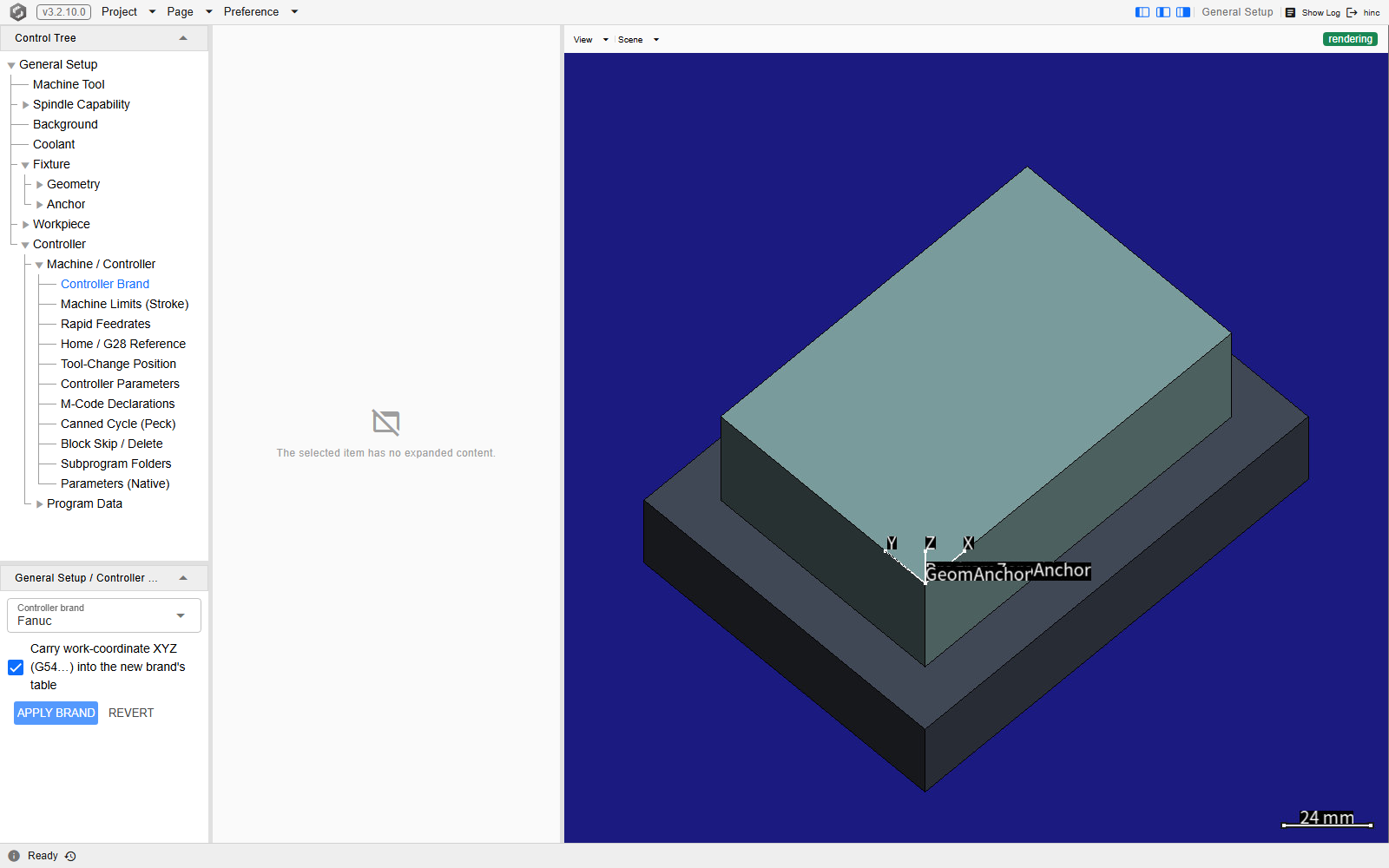
The Controller Brand leaf on a demo project, at
/equipment?tree=equipment/controller/machine/brand. The machine plane above it is expanded, so
every node this brand grows there is listed, with the Parameters (Native) group folded; the editor
column beside the tree carries the
Controller brand select reading Fanuc, the carry checkbox ticked, and the Apply brand and
Revert buttons that are enabled only while a different brand is staged.
The two planes
Every node under the Controller root hangs on one of two group stems, and which one it is on says what it describes; selecting a stem lists its children.
| Plane | Tree id | What sits on it |
|---|---|---|
| Machine / Controller | equipment/controller/machine |
What the machine is wired to do: travel limits, rapid feedrates, the home / G28 reference, the tool-change position, the controller parameters in both a grouped and a native form, the peck clearance, M-code declarations, block-skip layers, subprogram folders and, on Siemens, the indexing position tables |
| Program Data | equipment/controller/program-data |
The tables a program reads and writes: work coordinates (G54…) and tool offsets on every brand, plus the brand's own — Siemens frames, $TC_DP offsets, tool names and R parameters, Heidenhain datum presets and shifts, Fanuc-family retained common variables |
The machine plane's per-axis rows are driven by the machine tool's chain: every brand preset already declares X, Y and Z, and attaching a machine tool adds that chain's own axes beside them. Program data stays with the project, and so does the brand's parameter table: loading a controller file of the brand already in force leaves both as they are — travel limits, rapid feedrates, home reference, M-code declarations and native parameters included — and takes from the file only its dialect and the runner-owned settings (the tool-change position, block-skip layers, subprogram folders and iteration guards). For the same reason, a file written by Save As carries the parameter table the controller came in with — its brand preset's, or the loaded file's — and not the edits made to it on the Machine / Controller plane.
Machine Limits (Stroke) (equipment/controller/machine/limits) holds each axis' + Limit and
− Limit, and above its table sits the Stroke limit check switch, on by default and saved with
the project. While it is on, every step a play makes is checked against those limits — a step past
one is reported under Step Diagnostics and, while Pause on Failure is on, pauses the play —
and a session warns under Shell, as it begins, about any linear axis without both limits.
Switching it off stops both. It does not stop the check of the program's own blocks, which compares
the machine position each block ends at with the limits set in the table: a block that ends past one
is reported under NC Diagnostics either way. That check sees only where a block ends, so a
motion that leaves the travel mid-block — a drilling cycle's plunge to the hole bottom (the cycle's
block ends back at the R level or the initial level), or an arc that bulges past a limit between
its end points — is caught only while the switch is on, by the check of each step. A rotary axis
whose two limits are set less than a full turn apart is a limited-travel axis to the play as well: an
absolute word moves it to the written position without rolling over the shortest way round — a tilt
axis at ±120° commanded from −100° to +100° turns +200°, not −160° through the stop — while a rotary
axis with one limit, none, or a turn or more between them (a table's display range entered as 0 and
359.999 counts as a turn) rolls over. On a SINUMERIK the machine data decides instead of the limits:
a rotary axis rolls over only when its MD30310 row under Parameters (Native) is 1 — the
control's factory value is 0, which the play assumes for an axis without the row.
Parameters (Native) (equipment/controller/machine/native) is a group of three leaves —
System Parameters, Axis Parameters and Axis Parameters (Integer) — that show the brand's
parameter table as HiNC stores it: raw values, with no unit conversion, each under the id HiNC keeps
it by. A row whose meaning HiNC knows carries a short caption under its id, and where the caption
names a unit — Positive stroke limit (mm or deg), say — that is the unit the row holds. The
interface-form nodes on the same plane edit that same table. The ids are HiNC's storage keys,
modeled on the brand's parameter numbers but not always the real controller's own.
A row whose id is known not to be the controller's number for its value says so in an orange line
with a warning icon under the id, in any of the three leaves. On every brand the two stroke-limit
rows carry it — Axis Parameters holds them once a limit is set. On Fanuc so do the number of
controlled axes and the peck retraction clearance; on Siemens the reference point position; on
Heidenhain the reference point position, the maximum spindle speed, the axis type and the tool-axis
direction. On Syntec, whose keys follow the Fanuc table's numbering rather than Syntec's own, every
row with a caption carries it, the cutter compensation type and the work-offset rows included,
except the peck retraction clearance: a Syntec control keeps that value at Pr4002 too. Mazak shares
the Fanuc table and its FANUC-style numbers, but a MAZATROL control names its parameters by letter
group (F91, M1, …) rather than by number, so on Mazak every row with a caption carries the line
except the work-offset rows, whose addresses — #5221 onwards for G54–G59, #7001 onwards for
G54.1 P — are Mazak's own system variables for those offsets. A row without the line claims nothing
either way: only the rows known to differ are marked, so its id may or may not be the controller's
number.
The stroke limits show why neither the number nor the figure on the control's screen can be copied
as it stands. A FANUC 0i-C keeps the positive end of stored stroke check 1 at No. 1320, while
#1320 here holds the negative end, and a SINUMERIK keeps its minus end at MD36100 and its plus end
at MD36110, the reverse of the two rows here. A FANUC 0i-C's parameter screen also shows those
limits as integers in the least increment (0.001 mm under IS-B), while the rows here hold mm or deg,
as their captions say: a limit at 500 mm reads 500000 there, and typed in as shown it becomes a
limit at 500000 mm that no motion reaches, so the check never fires. No. 1240, the first reference
position, is shown the same way, and its row here has the same number and no warning line: a
matching number says nothing about the unit. Copy a value off the real control by what it means —
for a stroke limit, which end it is — and in the unit the row's caption names, not by its number.
Work Coordinates (G54…) always lists the plain G54–G59 rows its brand's table holds — Siemens seeds
only G54–G57 — and, on Fanuc, Mazak and Syntec, the extended G59.1–G59.9 rows of the
brand-neutral table that sits behind the brand table; it shows the G54.1P and G505–G599 rows
once a value is non-zero or the Show all toggle is on. On Siemens the rows are the settable frames
that Frames (Siemens) also lists, and on Heidenhain G54–G59 are rows 1–6 of
Datum Presets (Q339), so an edit in either place shows in both. Each row carries P0, which
writes the machine coordinate the workpiece's program-zero anchor sits at, and M0, which writes
machine zero; clicking anywhere in a row also marks that coordinate on the canvas. Both write into the table; neither moves the part.
The other direction — moving the part so that program zero lands on the offset a row already
holds — has no control on this branch. It exists as an HTTP call and a mission-script call that
rewrite the transformer of the fixture branch leading from its Geometry Anchor straight to its
Table Mount; on the page, the part is placed by hand, in the Topology column —
Program Zero Alignment. The same page covers two things a recorded
offset may need before it is typed in: a row is measured to the spindle's tool mount rather than to
a tool tip, and there is no row for a Fanuc-style external work offset (EXT), so that offset is
added into each row the program uses.
Tool Offsets (equipment/controller/program-data/tool-offsets) holds one row per tool number,
H and D together: Ideal Height (mm), Axial Wear (mm), Ideal Radius (mm) and
Radial Wear (mm). While Set ideal offset dependent on tool house is on, the ideal columns
follow the Tool House (Cutter) — a row per tool, its height the tool's length from the
spindle mount to the tip — and are rewritten when the switch is turned on, when
Refresh from Tool House is pressed and at the start of every play; rows cannot then be added,
renumbered or deleted, and only the wear columns take typing. Radius basis decides what that
rewrite puts in the ideal radius:
Cutter radius (D row = cutter radius; NC is the part contour) writes the cutter's largest profile
radius, for a program posted on the part contour, and
Zero-based (D row holds wear only; NC is the tool-centre path) writes 0, for a program whose CAM
already emitted the tool-centre path. Changing the basis while the columns follow the Tool House
rewrites them at once. On Siemens the leaf reads Tool Offsets (ISO G43 H) and serves the ISO
G43 H path only: a D word reads Tool Offsets ($TC_DP), and falls back to this table's height,
with a warning, when that table has no row for the tool and edge.
A table that is not there
A node the active brand has no concept of is never created rather than shown and disabled — Frames
on Fanuc, Retained Common Variables on Siemens, Block Skip / Delete on Heidenhain — and a ?tree=
link naming one does nothing on the wrong brand, so name the brand alongside any id shared. Nor is an
id promised to survive a version change — see Finding Your Way.
Two further rows may differ from a colleague's tree for an unrelated reason: CSV Controller and
CL Controller are separate non-brand controllers, absent until their box under
Preference › Optional Nodes & Charts is switched on, and which box is on is a per-device setting —
see Preferences. Unlike a brand-gated node, though, these two are still
reachable by link: a ?tree=equipment/controller-csv or ?tree=equipment/controller-cl mints the
node and selects it whatever the box says — when the Equipment tree is built on that address with a
project open, as it is in a new tab or on a reload. Followed from a screen that has already shown
Equipment for the project, the address is dropped; the note under
Linking to a node has the detail.
The Preference menu answers whether you need either of them. Under each of the two checkboxes it reads This project plays CSV / This project plays CL, or Not used by this project, worked out from what the open project actually plays — the kinds its mission commands name, the play verbs its scripts call, and, for CL, a machine tool that can only be driven from CL. While the project plays a kind whose box is clear, the Optional Nodes & Charts row says so too — This project plays CSV — before its submenu is opened. Neither node is a setup task in its own right: both are childless leaves with no Object Management, because a CSV or CL pipeline is not loaded, pasted or saved as a file the way a brand controller is. Switching a box on reveals the pipeline's settings; leaving it off on a project that plays neither costs nothing.
See Also
- NC Dialects — what each brand's G and M vocabulary actually does, once the brand is picked
- Machine Tool — the chain whose axes fill the per-axis rows on the machine plane
- Program Zero Alignment — the other half of a work offset: where program zero sits on the workpiece
- Setup — the rest of the pre-simulation configuration