Preferences
The settings that follow the application rather than the project are kept on two sides: the service, where one value serves every browser signed in to it, and the browser, for the device it is sitting at. The Preference menu carries seven of them — the language, the physics switch, the two controller checkboxes, the two sensor-chart checkboxes and the Block Info panel's raw JSON checkbox — and the rest are reached from the panel each one belongs to. Which side keeps a setting is the thing worth knowing about it, because that is what decides who else sees the change.
Where it is
The Preference dropdown on the menu bar, between File and Help. Language and Show Physics Options come first; below a divider, the Optional Nodes & Charts submenu holds the five checkboxes that each add one thing to one page, grouped under the page they add to — Equipment Page for the two controllers, Execution Page for the two sensor charts and the Block Info panel's raw JSON view. The dropdown carries no OK and no Cancel: every control commits the moment it is pressed. Picking a language closes the language submenu and the dropdown with it. Ticking or clearing a checkbox leaves its menus open — the dropdown, and the submenu when the box is in one — unless the change takes away the node selected on the page in view: the selection then moves, the address is rewritten to match, and a change of address closes every menu. Nothing in the dropdown commits on a close. A setting the service refuses is rolled back in the menu, so the dropdown never shows a value that did not take — the refusal arrives separately, as a message naming what failed.
What the dropdown carries
Language opens a submenu of the codes the service offers, each row carrying a language's own name
over the code that names it — English over en, the two Chinese scripts over zh-Hans and
zh-Hant, Tiếng Việt over vi, and 日本語 over ja. The caption on the parent row is the
language in force.
Picking one re-resolves the interface immediately and without navigating, which is why the
confirmation message already reads in the language just chosen. The service keeps this one.
If the browser cannot fetch the new language's text in time — which can happen on a page left open
while the service was updated, or on a connection that takes more than four seconds to deliver
it — the interface stays in the language it was showing, and a message says the language was saved
but its text did not load in time, and to reload the page if the interface does not switch. The
service has kept the choice, so the caption already names the new language, and when the text was
only slow the interface switches by itself as soon as it arrives. Opening the application over a
connection that slow goes the same way: it opens in English and switches when the text arrives.
Show Physics Options reveals the parts of the three tree pages that exist only for the milling physics, listed under What the physics switch shows below, and switches the cutter drawn on the Tool House canvas and on the Execution page's CWE canvas from a plain bounding shape to its detailed flute geometry. The service reports whether the physics feature is licensed alongside the setting itself, and without that licence the checkbox is drawn disabled and clear, with nothing in the menu saying more about why. Where the licence is present the setting starts on: a service that has never had a preference saved reports it as on. The service keeps this one too.
Optional Nodes & Charts opens a submenu of the five checkboxes below, each under a heading naming the page it adds to. The row itself carries a caption only when the open project plays a kind whose box is still clear — This project plays CSV, This project plays CL, or This project plays CSV / CL — so a controller the project needs is announced before the submenu is opened; otherwise it has none. Like the captions under the two controller boxes, its answer is read when the dropdown opens; ticking the box of a kind it names takes that kind off it at once.
CSV Controller and CL Controller, the submenu's Equipment Page group, each add a node of their own to the Equipment tree once a project is open — with no project open neither node is built, whatever the boxes say. Both are kept by the browser, are clear by default, and are never sent to the service. The caption under each box says whether the open project actually plays that kind — This project plays CSV, or Not used by this project — and is blank when no project is open and when the service cannot say; it is read when the dropdown opens, so it answers for whatever project is open at that moment. Clearing a box while its node is the Equipment page's selection moves that selection to Controller — and, with the Equipment page in view, rewrites the address to match, which closes the menus.
Sensor Cutting Force Cycle and Sensor Spindle Moment Cycle, the Execution Page group, each put a chart panel of that name into the Execution page's Step Info column. Both plot what a sensor on a physical rig measured — a dynamometer, a spindle moment sensor — so a shop without one never needs them, which is why they are clear by default. Like the controller checkboxes they are kept by the browser and never sent to the service.
Block Info · Raw JSON, the third box of the Execution Page group, is for development and support, as its caption says. Ticked, it adds a view switch to the title bar of the Execution page's Block Info panel — CNC view, the panel every user reads, or Raw JSON, the simulator's own record of the selected line, with a button that copies it (Inspecting a Step). The CNC view itself does not change with it. It is clear by default and, like the boxes above it, kept by the browser and never sent to the service, so ticking it in one browser changes nothing for anyone else.
What is kept where
One service holds one set of values. There is nothing per account: two people signed in under different names read and write the same language, the same physics setting, the same everything else on this side. A change one browser makes is what the next browser to ask will be told. What the service keeps this way is the language, the physics setting, the properties the Execution page lists for a selected step, which of that page's charts, its Session Messages panel and its Step Properties panel are switched on, the Equipment canvas's display options including the work coordinate its marker draws, and the graphic cache budget.
The browser keeps the arrangement of the screen in front of it. That is the three tree pages' layout — which columns are shown, how wide the docks are and how the right-hand dock is divided between its two columns, how tall the editor row under each tree is, which tree nodes are left unfolded, which node each tree page reopens on, the heights dragged between stacked panels, the two shared chart legend widths and the shared strip-chart x-axis mode — together with the five boxes of Optional Nodes & Charts above, the view the Block Info panel was last switched to, and the File Explorer's editor pane, its split, its auto-save and its sort order. Three of the Execution page's panels sit on this side rather than with that page's others: the 3D Rendering Canvas, CWE and Block Info. The browser also holds a copy of the language, used only to paint the first frame before the service can be asked; the service's value wins every disagreement, so a language changed from another browser shows up here immediately after that first frame.
The graphic cache budget is the exception on the service side. A new budget takes effect at once and applies to every browser on that service, exactly like the rest — but the write stops there. It reaches the service's preference file only when some later preference save writes that file out, so a service stopped before any such save comes back on the budget it had before.
What the physics switch shows
Show Physics Options takes effect the moment it is pressed, on every tree page, and the nodes that were unfolded stay unfolded: the Equipment and Tool House trees are built again around the new setting, and on Execution, where the setting changes the Mission branch and the keys the Step Colors branch offers, the Mission branch alone is. One thing holds the Execution change back: a mission command's editor open there with a change not yet saved settles it first, as it does before another node is selected — a Script asks Save & switch, Discard or Cancel — and while the change stays unsaved (Cancel, or a save that fails) the Mission branch stays as it was until you next select a node. What it adds while on, and takes away again when cleared:
- On Execution, the Availability Chart in the Strip Charts column, the Sim Cutting Force Cycle and Sim Spindle Moment Cycle charts in the Step Info column, the physics rows of the selected step's property list, and the Recompute step physics button on the Program row. The Surface Roughness Chart stays either way, keeping only its program-side series while the setting is clear.
- In the Execution tree's Mission branch, the NC Optimization Config command as a whole — in the tree and in the Add Command picker — and the Shot Files Output and Optimization Output sections of a Post-Execution command.
- In the Execution tree's Step Colors branch, the Physics keys of the Add terms… picker, of a term's Key and of a leaf's Value shown on the time chart, and on the Color Index Time Chart the band of a leaf that shows a physics value. A term or a shown value already on a physics key keeps it while the setting is clear, tagged Physics hidden, and the tree reads it all the same.
- On Equipment, the Spindle Capability and Environment roots and the Workpiece branch's Material group.
- On the Equipment and Execution canvases, the green observation ring of the tool in the spindle: while the setting is clear they draw the tool's cutter and holder alone.
- On Tool House, the Int. Holder node, the cutter's Insert, Material, Inner Beam and Optimization nodes, and the Integral Mode field on the Cutter node.
The two sensor charts are not on that list: they show what a sensor measured, not what the physics computed, and have checkboxes of their own.
A node the setting takes away can be the selected one. The selection then moves up to the nearest
node the tree still has, and the address is rewritten to match: Shot Files Output or
Optimization Output lands on its Post-Execution command, NC Optimization Config or a
node under it on Mission or on the List holding it, the Workpiece branch's Material
group or a node in it on Workpiece, and anything in the Spindle Capability or
Environment root, which goes whole, on Mechanism, the page's first root. On Tool House,
where the address is the selection, /tool-house/1/cutter/material with the setting clear, whether
opened that way or left open when the box was cleared, lands on Cutter and reads
/tool-house/1/cutter.
The two canvases follow rules of their own: the Execution page's CWE canvas re-reads the setting the next time the selected step changes, while the Tool House canvas fixes the cutter's shape when its rendering connection is made and holds it until that connection is made again.
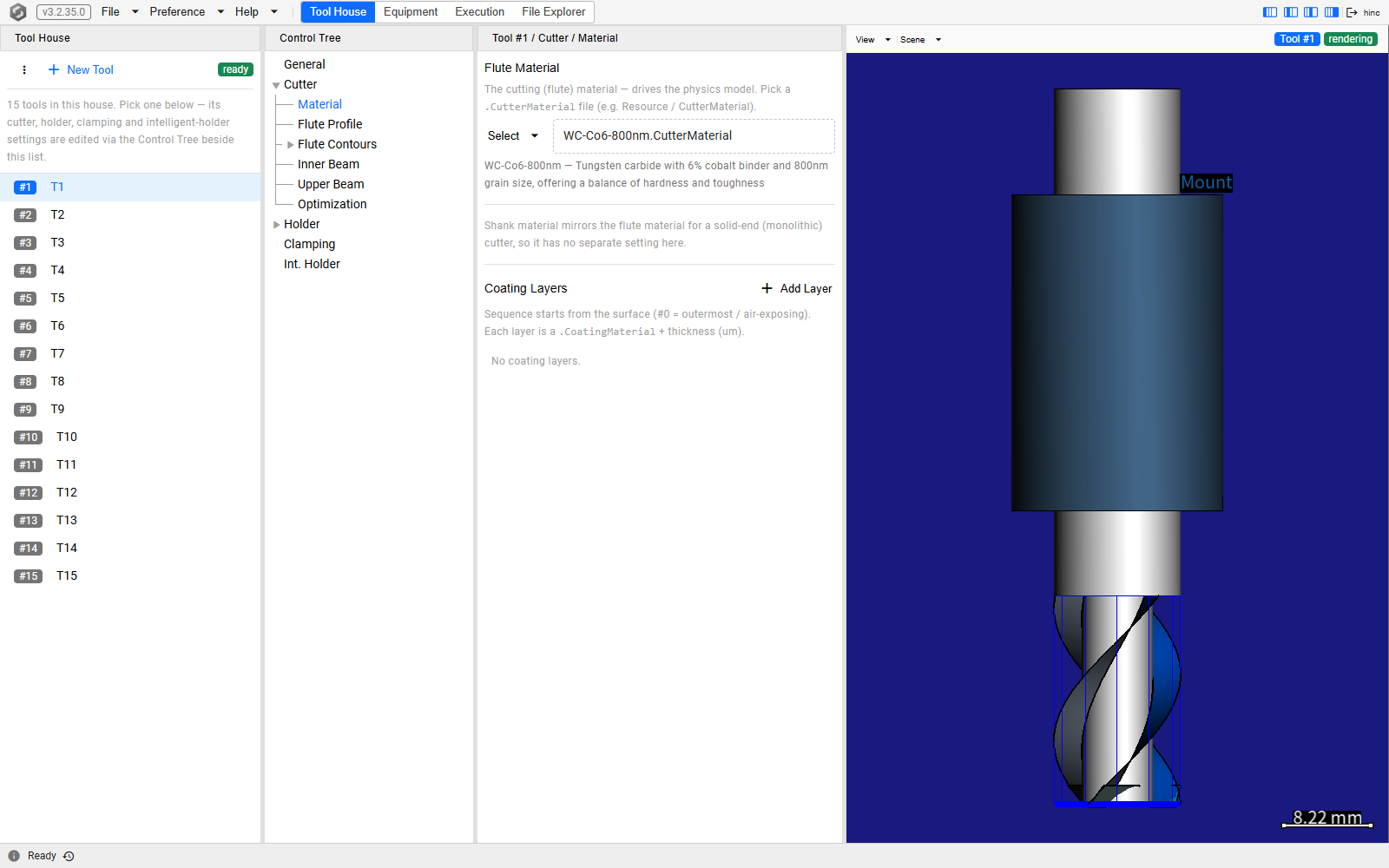
Tool House at /tool-house/1/cutter/material, with the setting on. Material is one of the Cutter
node's children only while the setting is on — Inner Beam and Optimization beside it likewise,
and Int. Holder at the foot of the tree. The editor shows the flute material picker with the
chosen material's description, a line saying a solid-end cutter's shank material is its flute
material, and the coating layers.
Settings that live elsewhere
The Log Viewer is an entry of the Help dropdown, not of this one, although its address is
/preference/log.
Step Present — which properties the Execution page lists for the selected step — opens from the title bar of that page's Step Properties panel, in the Step Info column; the small button there is titled Step Present — choose which properties are displayed. Its Clear and its Reset each ask for confirmation before they act, and its lists of keys are fetched again every time it opens and again whenever the language changes.
Graphic Cache is reached through a panel rather than through the menu bar. On the Execution page, with the canvas-and-messages column shown and the 3D Rendering Canvas panel expanded, that panel's title bar carries a toolbar; its Graphic Cache button opens the Graphic Cache (MB) panel — a Lower and an Upper field bounding a Current field and its slider. The toolbar belongs to the canvas and is only lent to the title bar, so collapsing the panel takes the whole toolbar away with it, Graphic Cache included.
Taking settings to another machine
Nothing carries a preference from one installation to another. A second service starts on the built-in defaults — English, and the physics options on wherever the licence allows them — and has no preference file at all until something is saved on it, so an installation that has never had a preference changed has nothing to carry in the first place.
What the browser keeps travels less far still. It belongs to one browser profile on one device, so the same person at a second machine, or in a private window on the same one, finds the tree pages laid out as they come and every box of Optional Nodes & Charts clear.
See Also
- Basics — the rest of what is true on every screen
- The Application Window — the menu bar this dropdown sits on, and what a language switch does to the footer
- Messages and Logs — the Log Viewer, which is on the Help menu rather than here
- Signing In — why one language setting serves everyone on the service
- Finding Your Way — the tree nodes the two controller checkboxes add, and the branches the physics setting changes