Anchors and Roles
Placing the fixture, the workpiece and the program zero relative to the machine. Each part carries named anchors and says which of them plays which role — the machine's table and tool mounts, the fixture's table mount, workpiece mount and geometry anchor, the workpiece's fixture mount, program-zero anchor and geometry anchor — and the setup task is two things: bind those roles, and give the branches between the anchors the transforms that put each part where it belongs.
What an anchor is — a coordinate system rather than a point — and how the equipment is assembled at the mounts is Assembly Anchors. This page is where the roles are bound and the transforms are typed.
Where it is
The Equipment page, at /equipment, in two places:
- The Roles panel at the end of each mechanism's item panel — Control Tree path Equipment /
Mechanism / Machine Tool, … / Fixture and … / Workpiece, tree ids
equipment/mechanism/machine-tool,equipment/mechanism/fixtureandequipment/mechanism/workpiece. This is where a role is bound to one of the part's own anchors. - The Topology column, the page's fourth column, right of the canvas. It draws the whole equipment as one graph and holds the editor for whichever anchor or branch is clicked. This is where the transforms live.
Deep links: /equipment?tree=equipment/mechanism/fixture,
/equipment?tree=equipment/mechanism/workpiece,
/equipment?tree=equipment/mechanism/machine-tool.
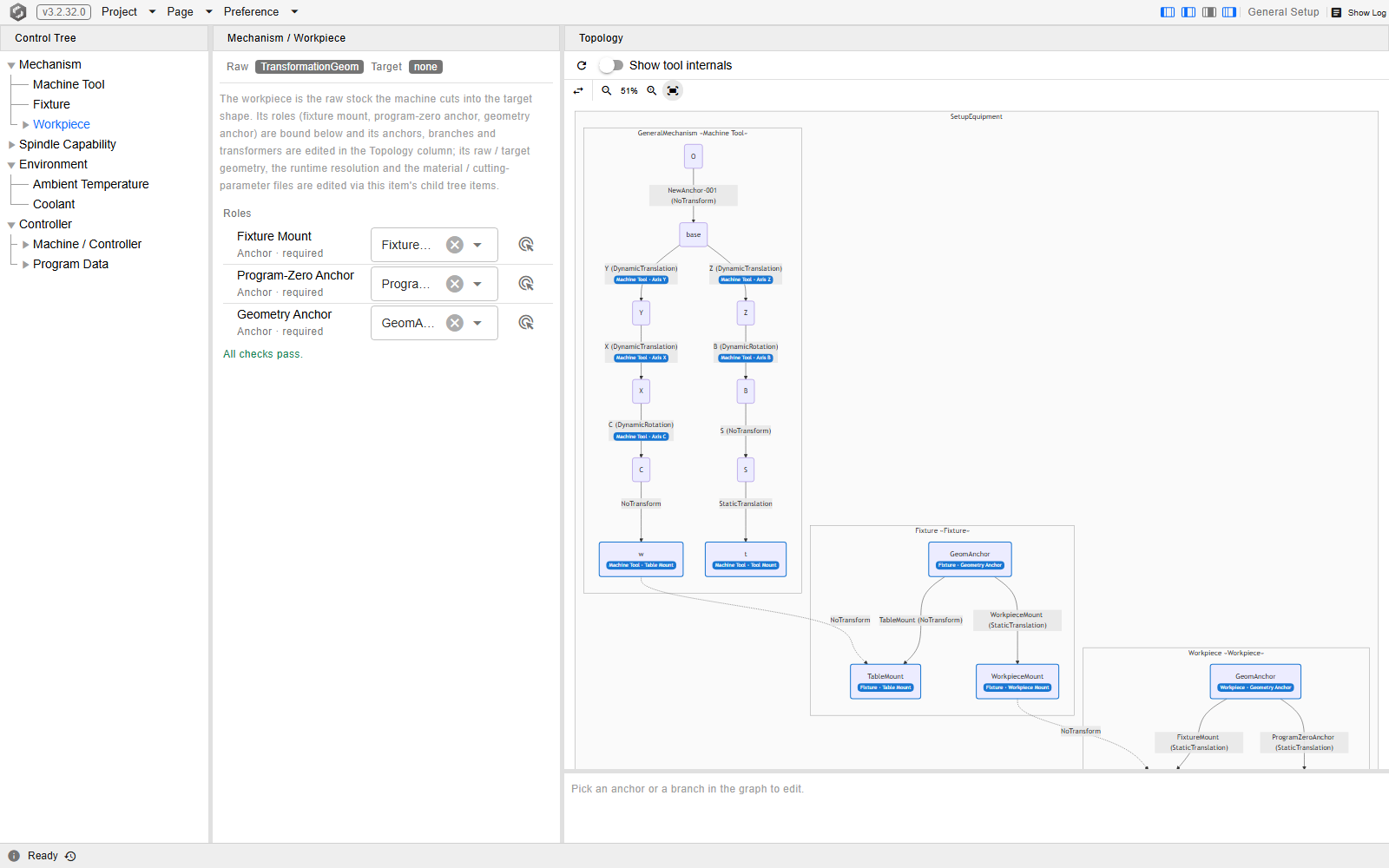
The Workpiece item selected on a demo project, at
/equipment?tree=equipment/mechanism/workpiece, with its Roles panel at the foot of the item
panel and the Topology column open on the right.
The tool is not placed here. It arrives on the spindle through the tool house, and how far it stands out of the holder is part of the tool itself — see Cutter.
The roles
Each part names its own anchors. The three item panels list them, one row per role:
| Part | Role | What it is |
|---|---|---|
| Machine Tool | Table Mount | The anchor at the worktable end of the machine, where the fixture (or a bare workpiece) is attached |
| Machine Tool | Tool Mount | The anchor at the spindle end, where the tool is attached |
| Machine Tool | Axis X … Axis C | The branch that carries each axis; optional, and each needs the matching transformer kind (a Dynamic Translation for X, Y, Z; a Dynamic Rotation for A, B, C) |
| Machine Tool | Spindle | The branch that turns the tool about its own axis, arriving where the tool mount hangs from; optional, and needs a Dynamic Rotation |
| Fixture | Table Mount | The anchor the machine's table end attaches to |
| Fixture | Workpiece Mount | The anchor the workpiece attaches to |
| Fixture | Geometry Anchor | The anchor the fixture's solid hangs on, and the root the fixture is placed from |
| Workpiece | Fixture Mount | The anchor the fixture's workpiece mount (or, with no fixture, the machine's table end) attaches to |
| Workpiece | Program-Zero Anchor | The NC origin |
| Workpiece | Geometry Anchor | The anchor the stock and the target shape are placed from |
The machine tool has these rows when it is a general XYZABC chain, the GeneralXyzabcMachineTool
type; a machine tool of any other type has no roles to bind, and its Roles panel says so. A part the
project does not carry, such as a missing fixture, reads Not mounted. instead.
Every anchor role is required; the branch roles — the six axes and the spindle — are optional. A file that predates the topology editor loads onto the default layout with these roles already bound: the fixture's root is its Geometry Anchor with one branch to each mount, and the workpiece's root is its Fixture Mount with one branch from the Geometry Anchor to it and one to the Program-Zero Anchor — each branch named after the anchor it arrives at.
Binding a role
In the Roles panel, each row shows the role's label, its kind (Anchor or Branch), required, and for an axis or the spindle the transformer kind it needs. To bind it either
- pick the anchor from the row's select — the candidates are the part's own anchors (or, for an axis or the spindle, its own branches, leaving out any marked as an error term); clearing the select unbinds — or
- press the row's pick button (tooltip Pick on the graph), then click the anchor or branch in the Topology column. While the role is armed, a chip in a strip above the graph says what to pick; the strip goes once the role is bound, or when it is disarmed by the same button or the chip's close icon. Clicking an element of another part, or one of the other kind (a branch for an anchor role, an anchor for an axis or the spindle), is refused and the role stays armed.
Under the rows the panel lists the server's checks on the current binding, or All checks pass. A check names a role that is not bound, one bound to an element outside the part's own assembly, an element that plays two roles, an anchor no branch chain reaches from the root, an axis or the spindle whose branch carries the wrong transformer kind, an axis or spindle branch off the chain between the two mounts, or a spindle whose rotation does not run along the tool mount's Z axis through its origin. Branches marked as error terms are checked as well: an axis or the spindle bound to a marked branch, a marked branch with a Dynamic kind, one between the spindle and the tool mount, and any other marked branch that is not the error term of an axis or the spindle — on the fixture and the workpiece, any marked branch at all. The first two come in only with a hand-edited file; the other two can also be left on the machine tool by a later edit — an axis, the spindle or a mount rebound, a solid hung on an error term's anchor, a branch added to or from that anchor, an anchor or a branch deleted — which is reported here, not refused. A binding the server refuses is not applied: the select snaps back to what was bound and the reason shows as a notification.
The transforms
A transform lives on a branch between two anchors, and the branches of the placing task are these:
| Part | Branch | What it places |
|---|---|---|
| Fixture | Geometry Anchor → Table Mount | The fixture onto the machine's table end |
| Fixture | Geometry Anchor → Workpiece Mount | Where the workpiece attaches, relative to the fixture geometry |
| Workpiece | Geometry Anchor → Fixture Mount | The stock onto that workpiece mount |
| Workpiece | Geometry Anchor → Program-Zero Anchor | Program zero, the NC origin, relative to the stock |
The attachments between parts — drawn as dotted edges in the graph — follow the roles and carry no transform of their own, with one exception: the worktable attachment, from the machine's table end to the fixture's Table Mount (or straight to the workpiece's Fixture Mount when the project has no fixture), has its own editable transformer. Clicking any other attachment shows Only the worktable attachment carries an editable transformer; the other attachments follow their roles.
Showing the Topology column
The column is shown by default on a window at least 1280 px wide. The menu bar's row of column buttons has a fourth button, Toggle the Topology column, that shows or hides it; its width is remembered with the other view preferences.
Editing a branch
- Click the branch in the graph. The editor card below the graph shows the branch's name, its two endpoint anchors, and its Transformer type.
- Pick the transformer kind in the card's select. Changing the kind replaces the editor beneath it, so a value typed under one kind does not carry over to another. On a branch bound to an axis or the spindle, a kind other than the one the role needs is refused and the select goes back.
- Type the values in the editor that opens under the select. The canvas redraws after each edit.
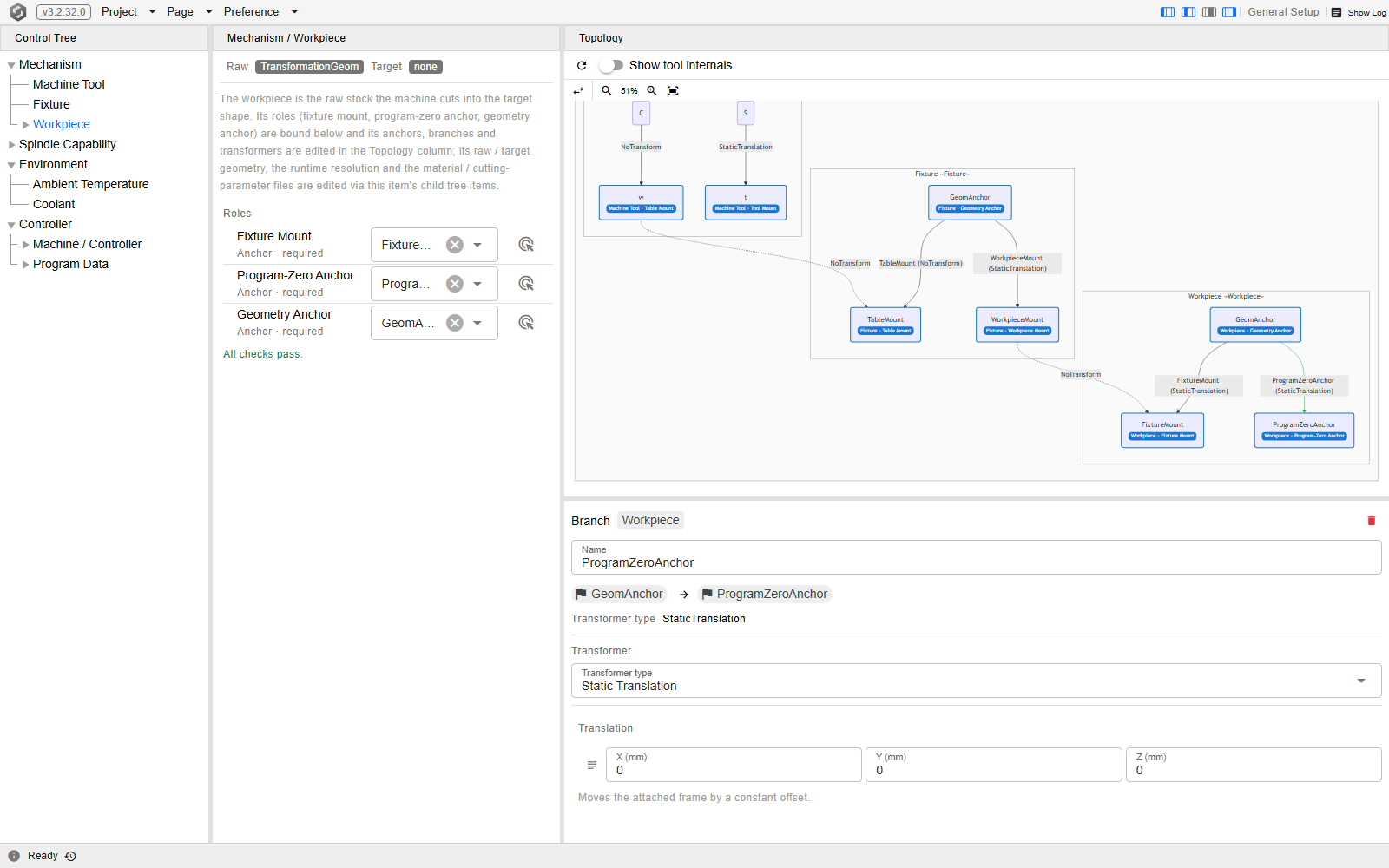
The workpiece's branch to its Program-Zero Anchor selected on a demo project, at
/equipment?tree=equipment/mechanism/workpiece; the editor card holds the endpoints, the kind
and the values in one place.
Seven kinds are offered on a branch:
| Kind | Use it for |
|---|---|
| Static Translation | A fixed offset. The usual answer for the four placing branches. |
| Static Rotation | A fixed turn — stock clamped at an angle, a fixture mounted rotated. |
| Static Freeform | A fixed transform given as a matrix. |
| General Transform | A scale, a rotation and a translation composed into one. |
| Dynamic Translation / Dynamic Rotation | A value that moves at run time. These are what a machine's axis and spindle branches carry; a setup placement is not one of them. |
| No Transform | No offset at all — the two anchors coincide. |
A branch bound to an axis or the spindle — Axis X … Axis C or Spindle — carries one more
control at the foot of its card, under the Transformer section: the Error term option, which
adds an error of the real machine to that axis or the spindle. Switched on, it inserts the error
term just before this branch — a new anchor, and a branch to it from the anchor this branch started
at — and this branch then runs from the new anchor, keeping its name, transformer and role. The new
anchor and the error term are named after this branch, or, when it has no name, after the anchor it
arrives at, with err added (Xerr for the branch X), and take a three-digit number, as in
Xerr001, when an anchor of the machine tool already carries that name. The error term starts as a
Static Rotation of 0°, which leaves the machine as it was until a value is typed. Switched off,
the option takes the error term and its anchor out again, and this branch runs from its original
anchor once more. The simulated controller computes the machine coordinates without the error term,
and the machine runs with it while the project's error terms are on; what an error term is for is
Error terms. While the error term stands, the card also shows:
- a chip beside the option: Error term, or Error term (not in effect) while the project's error terms are switched off on the Machine Tool item;
- the two anchors the error term joins;
- the error term's own Transformer type select and editor, where its value is typed; the select offers only the static kinds — Static Translation, Static Rotation, Static Freeform, General Transform and No Transform — since an error holds one value and no axis drives it.
The option is refused on a branch that is itself marked as an error term and on an axis branch between the spindle and the tool mount, and switching it off is refused while another branch already runs from where the error term starts to where this branch ends. A refused press leaves the option where it was, and the reason shows as a notification.
The graph draws every marked branch thick with an orange Error term badge, outlined and reading Error term (not in effect) while the project's error terms are off; the branch's card carries the same chip in its header, and its Transformer type select offers only the static kinds. An error term's own card also names the axis or the spindle it belongs to — for the X axis, This branch is the error term of Axis X; it is added and removed on the card of Axis X. — and carries no option of its own.
No other card offers a mark. A mark that is no axis's or spindle's error term — one a hand-edited file brings in on a branch of the machine tool, the fixture or the workpiece, or one a later edit leaves on the machine tool, as listed under Binding a role — is named on its branch's card, under the line naming its transformer type, with the Roles panel's finding about it and a Clear mark button that takes the mark off and leaves the transformer as it is. The tool's branches, the attachments and a CL-driven device offer neither the option nor the button.
The refresh icon at the right end of the column's title bar (tooltip Refresh) re-reads the
graph. Each part is drawn as a cluster titled with its assembly's name followed by a blue badge
naming the part — Machine Tool, Fixture, Workpiece or Tool — inside one enclosing
cluster for the whole equipment, which carries no badge. The tool appears only with its assemblies
and the anchor it mounts by; it is not edited here. Clicking a cluster of the machine tool, the
fixture or the workpiece opens its card, where the assembly can be renamed, and selects that part in
the Control Tree, where its roles are bound.
Clicking an anchor opens the same card for the anchor — rename it, Extend a new anchor from it,
Add Branch to another of the part's anchors, or, on the machine tool or the fixture, hang a
solid on it with the Geometry checkbox — which is how a topology beyond the default layout is
authored, the machine tool's included: Building Virtual Machine Tools builds a
whole machine this way. A machine tool of any type other than GeneralXyzabcMachineTool is drawn
and selected the same way but is read-only: its cards carry no name field and no tools, and say
… is shown here but not editable. with the machine's type name in front.
The order to work in
- Attach a machine tool first. The table end the fixture is placed against belongs to the machine, so there is nothing to place against until one is loaded — Machine Tool.
- Place the fixture on the table on the fixture's branch from its Geometry Anchor to its Table Mount.
- Place the workpiece on the fixture — the fixture's branch to its Workpiece Mount says where the workpiece attaches, then the workpiece's branch to its Fixture Mount puts the stock onto that mount. A project carrying no fixture skips both: the workpiece is then attached to the machine's table end directly.
- Set program zero last, on the workpiece's branch to its Program-Zero Anchor, once the stock is where it belongs. Which direction to align it, and what to align it against, are Program Zero Alignment.
Checking the result
The Scene dropdown above the canvas has an Anchors group that draws what has just been placed: Fixture Geometry Anchor, Workpiece Mount, Table Mount, Workpiece Geometry Anchor, Program-Zero Anchor and, as one overlay, Role Anchors — every bound role anchor of every part (the machine's two mounts, the fixture's three anchors, the workpiece's three) drawn as coordinate triads, whatever the per-anchor checkboxes say. Turning on the two ends of a branch you have just set is the quickest way to see whether it landed where you meant — a workpiece sitting a plate's thickness below the fixture is obvious as soon as both anchors are drawn.
The same dropdown's Solid group has a Machine checkbox, cleared to begin with, which brings the machine into the same scene so the assembly can be checked against the table it is supposed to be sitting on.
See Also
- Assembly Anchors — what an anchor is, and the mount roles the equipment is assembled at
- Program Zero Alignment — aligning the program origin once the workpiece is placed
- Machine Tool — the part whose Table Mount and Tool Mount the fixture and the tool attach to, and whose chain is loaded from a shipped machine and edited in the Topology column
- Fixture — the item whose Roles panel binds the fixture's three anchors, and the rest of its setup
- Workpiece — the item whose Roles panel binds the workpiece's three anchors, and the rest of the workpiece setup
- Equipment Topology Column — the component behind the Topology column and the Roles panels: its routes, role checks and error codes
- Setup — the rest of the pre-simulation configuration