Projects
A project is the whole of what a simulation runs against: the machine tool, the spindle capability, the ambient and coolant conditions, the fixture, the workpiece, the tool house, the controller and the NC programs a mission plays. It is a project file together with the folder that file sits in, and the File dropdown on the menu bar is where one is created, opened, saved and closed. The equipment and mission screens are editors on whichever project is open, so a change of project reaches all of them at once.
Where it is
The File dropdown, at the left of the menu bar ahead of Preference and Help. Its first row is a read-only field holding the path of the open project — selectable, so it can be copied — and reading No Project Loaded until one is open. The path is written relative to the admin directory the service was started against rather than as a location on the machine running it.
That row is the only place the path stays put; everywhere else it is transient — a line drawn while something is happening, or a record of something that has. While a project action is running, the footer's background zone names the action and the path together, as Loading project: … and its equivalents for the other entries. The toast that reports the finished action carries the path as its caption, and that line outlives the toast in the footer's Recent messages list. The service holds one open project rather than one per browser, so every browser connected to it is working on the same project.
What each entry does
| Entry | What it does |
|---|---|
| New | Creates a project at a chosen path and opens it, refusing a path that already holds a file |
| Load | Opens an existing project file |
| ReLoad | Re-reads the open project from its own path, discarding anything unsaved |
| Save | Writes the open project back to its own path |
| Save As | Writes it to a chosen path, which then becomes the open project |
| Close Project | Closes it, leaving the application with no project |
ReLoad, Save, Save As and Close Project are greyed out until a project is open. New and Load are always selectable.
The three entries that need a path — New, Load and Save As — open the shared file browser as a picker, filtered to HiNC Project (*.hincproj). It never offers the Resource root: the Admin root is always there, and the Project root beside it only while a project is open. It opens at the Admin root — in the folder the open project sits in, when there is one. Saving forces the extension, so a name typed without one still gets it.
What a project actually is
The project file is an XML document of references. Values that mean nothing outside this one project are written into it directly, while the pieces that are shared, large or edited on their own — the machine chain, the spindle capability, the workpiece and cutter materials, the cutting parameters, the mesh geometry — are held as references to files beside it, each named by a path relative to the project file's own folder. Opening the project file in a text editor shows those references rather than what they point at.
Important
Neither a raw geometry nor a side file that points at nothing stops the project opening. Load
and ReLoad read what they can and report what they could not, and the action still reports
success. A raw geometry
whose STL is missing comes up with no geometry. A side file named as a reference — the machine
chain, the spindle capability, a material, a cutting parameter set — that is not where the project
file says it is, or cannot be read, leaves that part empty: nothing default is put in its place,
the reference stays in the project so a save writes it back unchanged, and putting the file back
and choosing ReLoad restores it. What needs the missing part is skipped when the program plays,
with a message that names the file. The project file itself is the exception: one that cannot be
read — locked, malformed, or gone by the time ReLoad reads it — fails the action, and no project is
open afterwards. Load and ReLoad release the project that is open before they read the file, so the
meshes of two projects are never in memory at once; putting the file back and loading it again is
the recovery. A mesh-geometry .wct file a raw geometry names is quieter
still: the load neither opens it nor mentions it, and the first word about it is a warning raised
when the meshed geometry is first needed. Where a load succeeds with a hole, the message is the
only thing that says otherwise, and it is not kept where a run's messages are kept: see
Messages a project load raises.
A project is therefore a folder at least as much as a file. Copying one to another machine, archiving one, or handing one to somebody else means taking the folder.
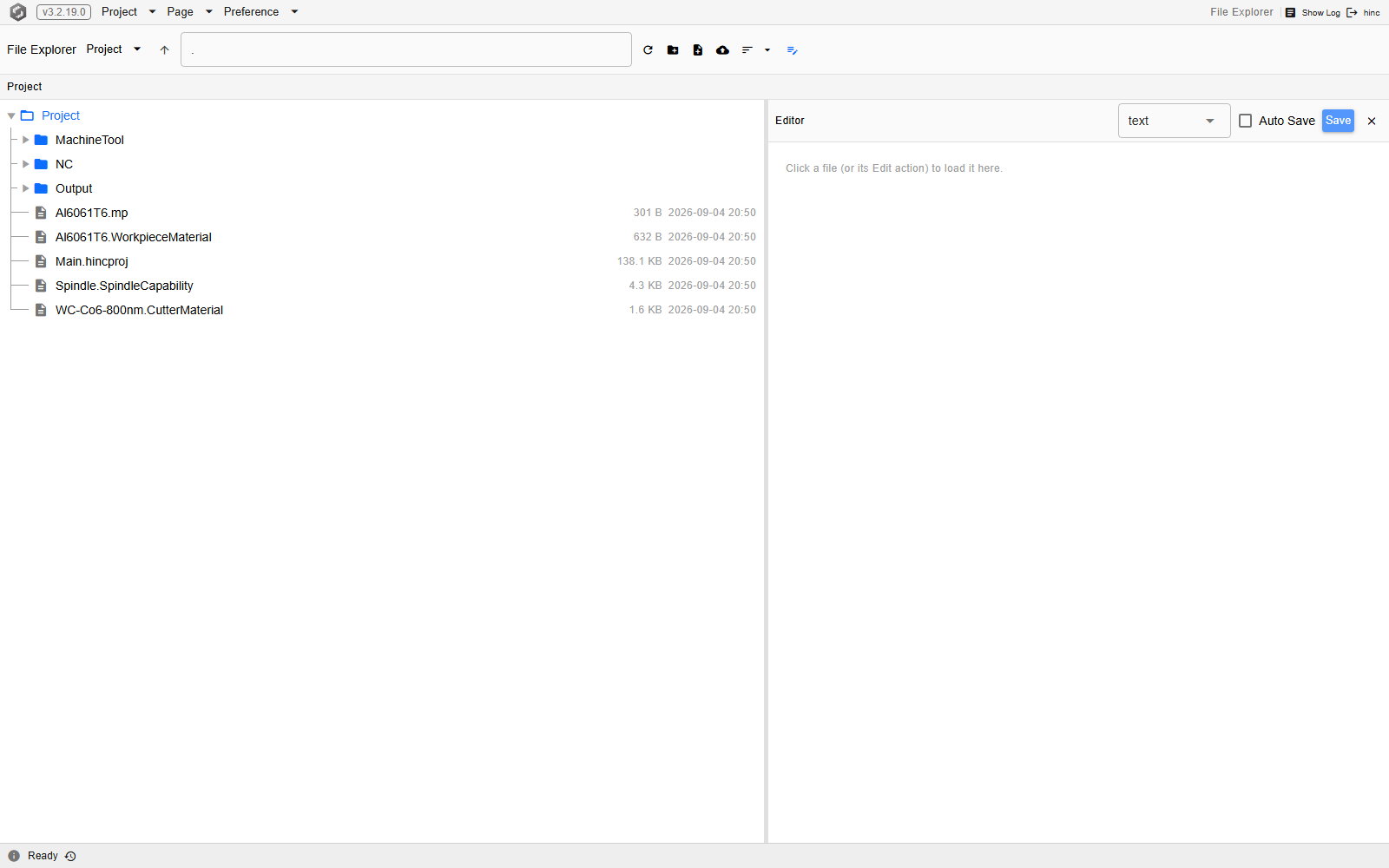
The demo project's own folder, at /util/file-explorer/Project. The File Explorer's root switcher,
beside the page name, is set to Project — the root that exists only while a project is open, and
that resolves to the folder holding the open project file — and the path field reads ., the root
folder itself. Three folders sit at the top, MachineTool, NC and Output, and five files
below them: the cutting parameters and the workpiece material, the project file itself at
138.1 KB, the spindle capability, and a cutter material. The right-hand pane is the explorer's text
editor, waiting on a file to be given to it.
Warning
A Save As into a new folder can produce a project that finds none of its programs. Save As
writes out the side files the project file references — the machine chain, the spindle capability,
the materials, the cutting parameters, and the STL meshes the equipment and the workpiece name —
into the new folder and at the same relative place. Two things travel as a path with nothing
behind them: a mesh-geometry .wct, which is never written out at all, and an STL that was
already missing when the project opened, which is deliberately left missing rather than replaced
by an empty file. Neither are the NC programs a mission plays: the project records
each as a path, and nothing on the save side copies the file. Nothing rewrites those paths either,
so the saved project still asks for NC/…, now
underneath the new folder, where nothing has put it. The programs have to be brought across by
hand, or the Save As aimed at a folder that already holds them.
The folder a run writes its output into is named the same way, and it is not a dependency of the same kind: nothing has to put it there, because the writers create it on demand under the folder the open project was read from. A Save As does not move it — a run still writes beside the folder the project came from, until that project is opened at its new path.
What a project change does to the rest of the window
New, Load, ReLoad and Close Project each throw away every screen the browser has built and rebuild against whatever the project is afterwards, and so does a Save As to a location other than the one already open — which is what stops one screen showing values from a project that is not open any more. A Load that picks the project already open rebuilds as ReLoad does: the file is read again on the service, and the screens are built again against it. A Save, and a Save As back to the path already open, rebuild nothing. The Application Window states the same rule from the frame's side, and covers what a rebuild costs a screen carrying unsaved state.
How far a change travels beyond the browser that made it is not the same for every entry. New, Load, ReLoad and Close Project are announced to every browser connected to the service, and every such browser rebuilds — after a ReLoad, or a Load of the project already open, as well, although its path did not change.
Save As announces nothing at all. The service moves onto the new path, and only the browser that performed the Save As is told, in the reply to its own request. Every other browser goes on displaying the old path in its File dropdown, although the service is working with the new one underneath — so a Save from any of them writes to the new path. A stale row corrects itself the next time the service reports its state to that browser: a reload, the browser's status connection dropping and coming back, another project change, or a run being started, paused, finished or reset from any browser.
New, Load, ReLoad, Save, Save As and Close Project take a turn each. A second one asked for while the first is still running is refused rather than queued, and the refusal arrives as a warning reading Another project operation is in progress. Please try again. Close Project holds the turn like the other five: a Close asked for while a Load is still reading is refused, and so is a Load asked for while a Close is still tearing the project down.
Losing work
Nothing keeps track of whether the open project has unsaved changes. No marker in the menu bar or in the path row says the project has been edited, there is no prompt in front of ReLoad or Close Project, and nothing at all stands in the way of a browser tab being closed or reloaded. Both ReLoad and Close Project discard what the service is holding and has not written, in silence and at once; a Save beforehand is the only thing that keeps it.
Save As asks nothing either. Its dialog opens on the open project's own folder with the open project's own file name already filled in, and nothing checks whether a file is already at the path chosen: confirming writes over whatever is there. Confirming on the name as it arrives therefore overwrites the project that is open — which is harmless, being what Save does — but the same confirmation one folder away overwrites a different project just as quietly. New is the one entry that refuses: it will not create a project where a file already exists, and reports that as an error whose message can carry the location in full.
Before one is built
The data to collect from the machine owner before a project can be built is a checklist of its own: Project Data Checklist. The order the pieces then go together in is Project Construction.
See Also
- Basics — the rest of what is true on every screen
- The Application Window — the menu bar this dropdown sits on, and the page rebuild a project change triggers
- Finding Your Way — the screens a project change rebuilds, and what happens to a selection in one
- Messages and Logs — the footer's background zone and the toasts a project action raises, and where they can be read afterwards
- File Explorer — the browser these entries open as a picker, and the Project root that is this folder
- A Mission That Resumes — what a project's folder has to hold for a run to restart where the last one stopped