Spindle Capability
Describing the machine's spindle: how much power and torque it delivers at each speed, for how long, and how hot it may get. You fill it in from the machine builder's spindle data sheet, and every spindle number a run reports is measured against it. What the curves mean physically is Spindle Capability; this page is where you enter them.
Where it is
The Equipment page, at /equipment, reached from the menu bar's Equipment switch. Select the
Spindle Capability branch of the Control Tree (/equipment?tree=equipment/spindle) — the root
right after Mechanism, shown only while Show Physics Options is on in the Preference menu.
The tree and the selected node's editor sit side by side as the page's first two columns, and the
editor has the page's full height: the Power Contours and Torque Contours items each chart
their own contours above the point editor. Until a project is open the branch is inert: the root and
each child show No project loaded. Open or create a project first. in place of their fields, and
the root's Object Management (⋮) button stays disabled until a project is open. The selection
rides in the address bar as the ?tree= value the paths below quote; what those ids do and do not
promise across versions is Finding Your Way.
What each child asks for
The root node carries the ⋮ menu first, then the Name and the Note; the five children carry the values, and each edit lands on the project's equipment as you make it. A run already played keeps the spindle temperature and the accumulated spindle energies stored on its steps until you press Recompute step physics on the Program row of the Execution page, which is Recomputing a Finished Strip.
| Node | What to enter |
|---|---|
Thermal / Energy.../thermal |
Energy Efficiency, the output / input power ratio between 0 and 1; and the Working Temperature Upper Boundary in °C, the housing temperature the spindle is rated to work up to. |
Gear Shift.../gear-shift |
Whether the spindle has a gear-shift mechanism (L/H), and the Gear Shift Spindle Speed in rpm at which it changes range. Leaving the box clear states a single-range spindle; the speed field stays disabled. Once the box is ticked, the speed shows on both contour charts as a dashed line with its own L/H legend chip. Ticking the box starts the speed at 0: enter the speed at which the spindle changes range, and keep points of the continuous and the shortest-duration power contours on either side of it. At a step whose speed lies on a side where one of them has no point, no spindle limits can be read: the play goes on, carries the spindle temperature over such steps and says so once in a step warning — with the speed still at 0 that is its first step at speed 0, a step ahead of its first S word and as a rule its very first, unless those contours have a point at 0 rpm, as the shipped ones do. A side whose points carry no power leaves the spindle temperature unmodelled at those speeds — it is carried over from the step before, and a warning says so. |
Dry-Run Coefficients.../dry-run |
The Friction Power Coefficient (mW/rpm) and the Windage Power Coefficient (pW/rpm³), the spindle's dry-run idle power — the two terms and where each dominates are Spindle Capability. |
Power Contours.../power |
One kW-against-rpm curve per duty rating. |
Torque Contours.../torque |
One Nm-against-rpm curve per duty rating, from the spindle's own torque data, a limit of its own (the torque of the power curve only where the data give none). |
Entering a contour
- Select Power Contours or Torque Contours. Add asks for a workable duration in minutes, pre-filled with 60 — clear the field for the continuous curve — and starts the new curve as a copy of the selected one.
- Pick the curve to edit in the Contour selector, which names each by its duration and the unlimited one Continuous; its pencil button re-opens that duration, its delete button removes the curve, and a chip click on the chart selects one just as the selector does.
- The table below is the curve itself: one row per spindle speed and value, a + button that clones a row, a − button that removes one on a double-click, and a chart that redraws on every edit.
The delete button beside the pencil removes the whole selected curve once you confirm the prompt it opens. It is disabled while only one curve is left, so an axis that has curves cannot be emptied from here.
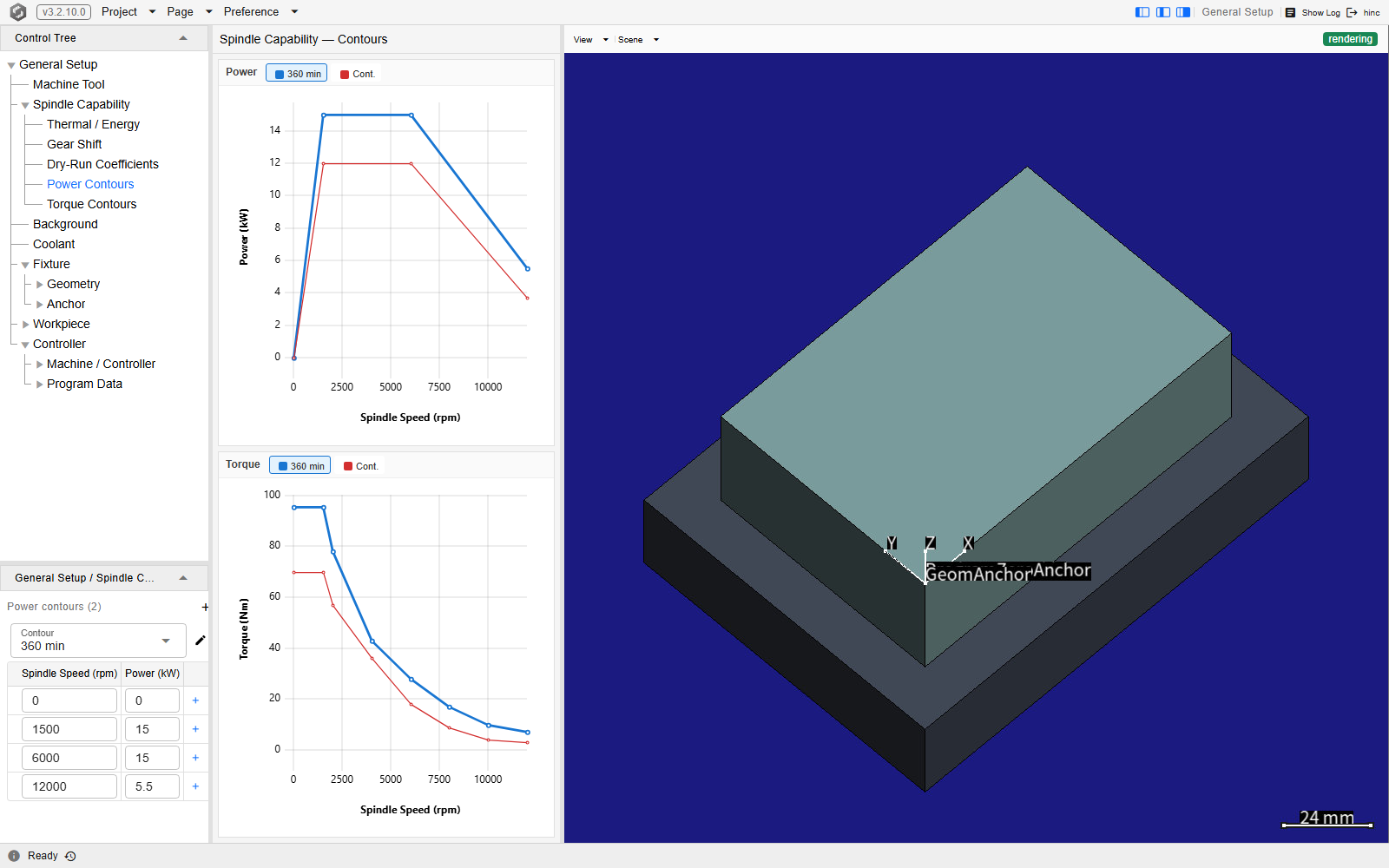
Power Contours selected on a demo project, at /equipment?tree=equipment/spindle/power, with
the Topology column hidden. The tree shows the branch's five children, and the editor column beside it
is the whole Power Contours item: the power chart on top, its legend carrying one chip per curve —
6 min and Cont. — then Power contours (2) with its Add button, the Contour selector
reading 6 min beside its pencil and delete buttons, and the four rows of that curve. A click on a
legend chip moves the editor to that curve. Torque Contours is the same editor over the torque curves.
Where the numbers come from
The machine's or spindle's spec sheet, as the speed–power–torque diagram with the duty ratings printed on it; which printed rating becomes which curve is Spindle Capability, which shows the mapping against a real datasheet chart. The default energy efficiency of 0.4 is the conversion HiNC's power figures were validated at, in Spindle Power Evaluation; what to ask the machine owner for is Project Data Checklist.
The two dry-run coefficients are the ones a datasheet almost never prints. Their defaults — 4.82 mW/rpm of friction and 90 pW/rpm³ of windage — are rough estimates from published studies of bearing friction and gear windage rather than measurements of a spindle, and they are a reasonable place to leave the field unless you have run the spindle empty and measured its idle draw. If you have, fit them from those readings as Fitting the dry-run coefficients shows: the spindle meter power and the spindle energy a run reports, air moves included, follow them.
Leaving the branch alone is a choice rather than a blank: a project never given a capability carries a
stand-in — the TMV-720A-STD-8000RPM spindle, the same curves as the shipped TMV-720A-STD-8000RPM.default.SpindleCapability, so
its name is what the root node shows: 15-minute, 60-minute and continuous curves on each axis, topping
out at 8000 rpm, with 0.4 efficiency and a 65 °C ceiling. That is fine for light cuts in small or soft
stock. Near the machine's limit it is the wrong envelope, and everything measured against it inherits
the error — the spindle torque, power and temperature ratios the run charts, and the feed the optimizer
assigns under the spindle safety factors, which are
Machine Condition and Safety Factors.
Loading and saving
The root node's ⋮ menu is the branch's whole file surface. The capability is stored in the project, so one already carrying the right spindle needs no file at all; Copy, Paste and XML Mode move it as XML, and an XML Apply replaces the capability as a Load does, but the project goes on saving it where it saved the old one.
- Load browses the server for a
.SpindleCapabilityor.xmlfile — the project or administrator directory — and opens in the administrator directory's shipped resource library, whoseSpindleCapabilityfolder holds the ready-made capabilities of The shipped capabilities. It replaces the capability outright; the branch and the charts reload onto the new one. A file from outside the project folder — a shipped one included — is first copied into it, a shipped one toSpindleCapability/under its own name and any other beside the project file, and the project keeps that copy from then on, so the file it was read from is never written over. A file picked inside the project folder is used where it is: each project save writes your edits back into it. - Save As writes the current capability out, offered as
SpindleCapability.xmlin the project folder: how a spindle you have tuned becomes reusable in the next project.
The shipped capabilities
One file per spindle class, from a BT30 tapping center to a BT50 two-range gear spindle. Seven of them are built from a vendor's own data, six from a public catalog, configurator, data sheet or manual and the FANUC aT12/12000i from its chart: each power curve follows the power the source prints or draws, and each torque curve the torque it prints or draws, or, where it publishes no torque, the torque of its power (the Mitsubishi page draws power only and prints one continuous torque). Five of the sources give a torque that is the torque of their power to the digits they print, so in those files the two curves agree at every point; most of them hold constant torque from standstill to the rated speed and constant power from there to the top speed, with the source's own derating points above, while HSD's table has no constant-power range, its power rising from 6,000 to its rated 9,000 rpm and falling above it. The FANUC chart draws a torque that is not the torque of its power lines, and Jäger's diagram and manual give, at each rated speed, a torque measured at a lower, loaded speed; those two files keep both axes as published: the torque curve and the power curve are two separate limits, the one compared with the peak torque within a spindle revolution and the other with the input power, the power averaged over that revolution divided by the energy efficiency (see How the four ratios are computed). The continuous rating is the Continuous curve, and a short-time rating is keyed by its minutes — an N-minute rating as N, an S3 or S6 x% rating as x% of the 10-minute IEC 60034-1 cycle unless the catalog states another cycle, so S6 60% reads as 6 min. Each file's Note names the document, the ratings it prints, the points read from a chart and the fields left at HiNC's defaults: the energy efficiency 0.4, HiNC's ratio of cutting power to spindle input power rather than the motor efficiency a manual may print (HSD's prints 0.8), and the 65 °C working temperature upper boundary and the two dry-run coefficients, which no catalog prints. The two other older files were read by hand from machine charts, their torque and power curves separately.
| File | Spindle | Top speed | Continuous / short-time power | Source |
|---|---|---|---|---|
FANUC-ROBODRILL-aDiBPlus-HighSpeed-24000rpm.default.SpindleCapability |
BT30 tapping and drilling center: the FANUC ROBODRILL α-DiB Plus 24,000 min⁻¹ high-speed spindle, high-power version | 24,000 rpm | 5.5 kW / 26 kW for 1 min | FANUC catalog RDRILLA-DiBPlus(E)-05 (2025), p. 8 |
TMV-720A-STD-8000RPM.default.SpindleCapability |
BT40 vertical machining center; the stand-in of a project without a capability | 8,000 rpm | 5.5 kW / 7.5 kW for 15 min, with 60 min curves | the machine's spindle chart, read by hand |
VP-8--Fanuc-10000RPM.default.SpindleCapability |
BT40 vertical machining center with a FANUC spindle | 10,000 rpm | 11 kW / 15 kW for 15 min, with 60 min curves | the machine's spindle chart, read by hand |
FANUC-aT12-12000i.default.SpindleCapability |
BT40 machining-center spindle on a FANUC αT12/12000i motor; its chart opens Spindle Capability | 12,000 rpm | 11 kW / 15 kW S3 60% (6 min) | the chart's printed ratings and its drawn torque curves |
Mitsubishi-SJ-VLS15-11FZT-15000rpm.default.SpindleCapability |
15,000 r/min direct-drive spindle motor of the 7.5 / 11 kW class (Mitsubishi Electric SJ-VL series, hollow shaft) | 15,000 rpm | 7.5 kW / 11 kW for 30 min | Mitsubishi Electric Automation, CNC Selection Guide Ed. 18 (2018), SJ-VL page |
Johnford-DMC-SH-BT50-6000rpm.default.SpindleCapability |
BT50 two-range gear spindle of a double-column machining center (Johnford DMC SH / PH), gear change at 1,500 rpm | 6,000 rpm | 22 kW / 26 kW for 30 min | Johnford catalog Middle DMC LM10E-17 (2018), p. 5 |
GMN-HSP-230-18000-18-18000rpm.default.SpindleCapability |
HSK-63 motor spindle for manual tool change (GMN HS series, asynchronous, oil-air bearings) | 18,000 rpm | 18 kW / 20 kW S6 60% (6 min) | GMN spindle configurator, HSP 230 - 18000/18 |
HSD-ES789-24000rpm.default.SpindleCapability |
HSK-F63 routing and aluminium electrospindle (HSD ES789, the 18 kW DP winding) | 24,000 rpm | 15 kW / 18 kW S6 60% (6 min) | HSD manual H5803H0005_EN Rev. 04 (2011), p. 34 |
Jaeger-Z100-H540.108-S3AW2-40000rpm.default.SpindleCapability |
HSK-E32 high-speed small-tool motor spindle (Jäger Z-Line, liquid cooled) | 40,000 rpm | 5.5 kW / 8 kW S6 60% (6 min) | Jäger data sheet 10405013-04 and operating manual Rev 03, section 6.2 |
See Also
- Spindle Capability — what these curves mean, and how the run's spindle ratios and temperature come out of them
- Project Data Checklist — the data to collect from the machine owner before filling this branch in
- Machine Tool — the machine whose spindle this describes
- Setup — the rest of the pre-simulation configuration