Selecting a Machining Segment
A peak on a strip chart is one step, while the cut it belongs to is a whole pass of the tool path, and the pass is what you look at and capture. A right-click on a chart makes that pass, or the whole feature around it, the display range: the charts zoom to it and the canvas draws its tool path alone.
The segment menu
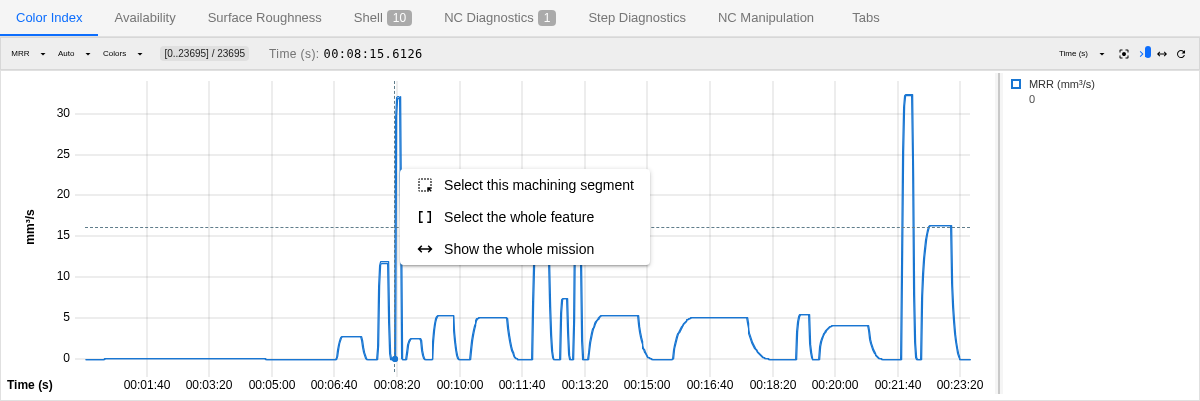
A right-click on any of the three strip charts of the Session Info panel (Watching the Run) opens a menu for the step under the pointer; a right press that moves pans instead. The menu opens as the button is let go, if the press did not pan: a right-click of the mouse or of a pen's barrel button, or a Ctrl+click on macOS, which opens it only if the press drew no zoom band; a finger opens it with a long press. A right drag begun elsewhere — on the 3D canvas, say — and let go over a chart opens none. Where a pixel column of a curve holds many steps, that step is the one drawn nearest the pointer, so on a peak it is the peak's own step, while a click there selects the column's first:
| Item | What it shows |
|---|---|
| Select this machining segment | The cut the step lies in, from the first move after the previous cut to the last move before the next one: the retract, the travel, a tool change and the approach on either side are in it. Cuts parted only by a lift at feed of less than 5 mm, with no rapid, tool change, rotary indexing (a rotary axis more than 5° apart at the two cuts) or change of work coordinates in it, count as one. A step that cuts nothing belongs to the cut before it when it carries on from that cut at feed with none of those between, as a line that cuts runs on past the stock; else to the cut after it when it leads into it so, its approach; on a rapid travel between two cuts, to the next cut, or to the previous one when none follows. A recorded play shown again by Review Play Result reads no change of work coordinates: there a short lift at feed across a G54 to G55 change joins the two cuts |
| Select the whole feature | From the last tool change, rotary indexing or block beginning with an N sequence number, at the step or before it, up to the step before the next one, cutting or not. A rotary indexing is a turn of a rotary axis by more than 5° in the travel after a cut, the last cut too; a turn before the first cut is no bound of its own, the first operation holding its tool change, its indexing and its approach, and a play without a workpiece cuts nothing, so no indexing bounds it: it is parted by its tool changes and sequence numbers alone. An indexing bounds it where the axis begins to turn, or at the next cut when only the move into it turns, so the exit and the travel before the turn stay with the feature before; a repositioning that also changes the tool or carries a sequence number is bounded by that alone, not at the indexing too. CAM output numbers each operation's first block, so this is usually one operation, even where the post writes that number on a line of its own, a block that moves nothing: the feature then begins at the first move after that line. Such a line is read off the NC file, and only where the move before it and the move after it come from one run through the same file: not where the operation before ends inside a called subprogram, not at the start of the next NC file of the mission, and not across a jump or into the next round of a loop — there the feature is bounded by its tool change or indexing alone. A numbered block that moves is not held to this. A jump's label on a line of its own (N22 of GOTO 22) is such a line where the program runs on into it, and bounds a feature there as an operation's number does. If the file has been edited or replaced since the play, the feature may not see the line until the program is played again; once the file is renamed or moved away, or a recorded play is reviewed where its NC files are not, the line is not read at all. A number counts only where the block that moved before it has none: a program that numbers every block, as the samples shipped with HiNC do, is bounded by its tool changes and indexings alone |
| Show the whole mission | Every step again, as Reset display range on the group bar does |
A click anywhere outside the menu closes it, as Esc does. On the chart, that click only closes the menu, selecting no step and zooming nothing; a click on the chart's legend, or a drag of the divider beside it, closes the menu and does what it always does: a series shown or hidden, the legend dragged wider. A right-click elsewhere on a chart, a long press or a Ctrl+click on macOS closes the menu and opens it again there, where a step lies under the pointer and the press does not pan. A right-click on the menu itself brings up no browser menu.
The menu open over a peak of the material removal rate at 08:15 on the Color Index tab:
What the range shows
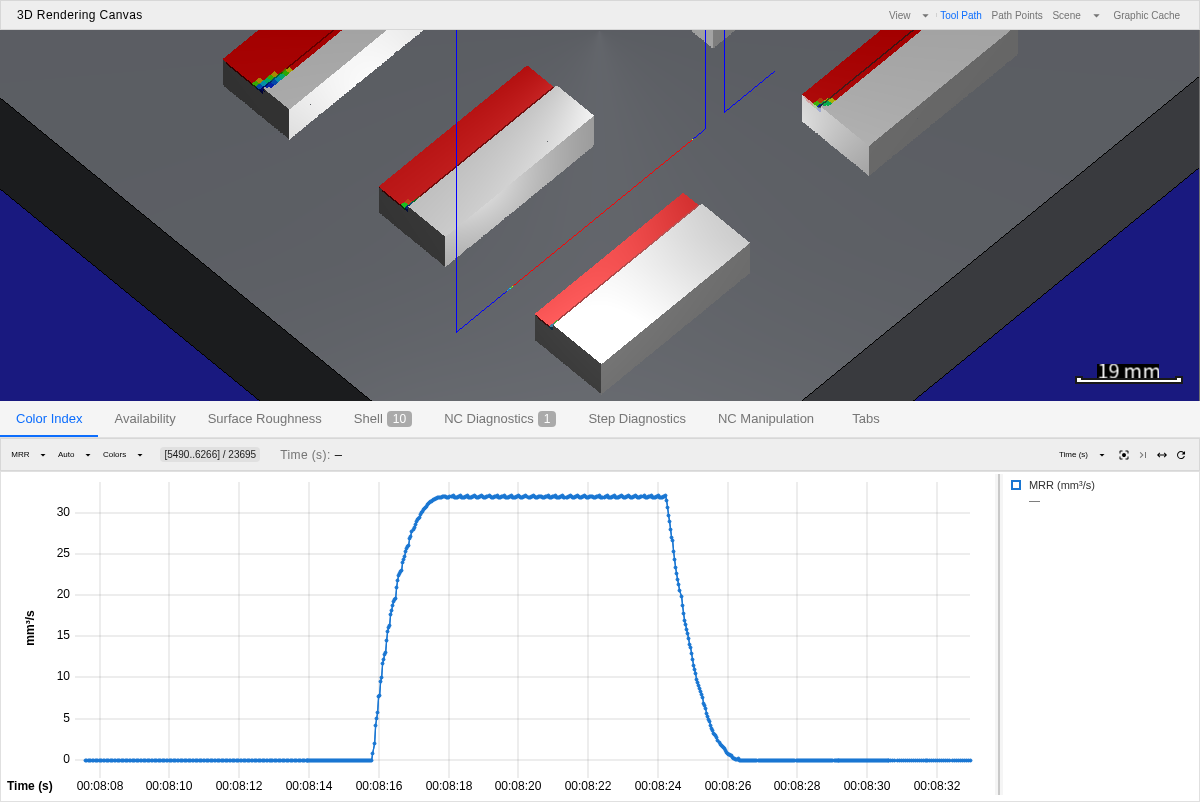
Either of the first two makes that stretch the display range: the range chip reads it, the charts zoom to it and the canvas draws its tool path alone. Neither selects a step or moves the camera; Fit view on the group bar frames where the stretch cuts. The workpiece stays as the run left it, since the display range narrows the tool path, not the part. When the stretch reaches the last step so far, the range stays on it while the run goes on — Stick to live end reads off — until Show the whole mission follows the running end again. On a run that cut nothing, or on a step that cut nothing while the steps around it are still being built, Select this machining segment reads There is no cut before or after this step.; on a step the play has not built yet — at the play head, or past where a stopped play ended — either item reads This step is not built yet: the play is building it, or stopped before it.
After Select this machining segment and Fit view: the range chip names the segment's steps, the chart spans the segment alone, and the canvas draws only its tool path.
From Block Info and over HTTP
Block Info carries the same action on its title bar for the block it shows — the selected step
when it lies in that block, else the block's first step — and names the segment's first and last
line (Inspecting a Step); over
the HTTP API it is POST /api/execution/cl-strip/select-feature-segment
(Strip Charts).
See Also
- Running a Simulation — the rest of running a job
- Watching the Run — the strip charts this menu opens on, the group bar's Fit view and Reset display range, and the canvas the display range narrows
- Inspecting a Step — Block Info's two buttons for the segment of the block it shows, and the line that names its first and last line
- Workflow: Building a Simulation Report — its section 8, which shows each problem spot as its whole feature, the range this menu sets
- Strip Charts — the component behind the menu, and
POST select-feature-segment: its body, the two rules' figures and its answer