Reading the Notes
What a built-in tree's chart says, in its Colors dropdown, about the steps its leaves cannot show. Where the two trees sit and what their leaves are is on Engineering View Coloring.
A chart drawing a built-in tree says, in its Colors dropdown under In the display range, what the leaves cannot show about the steps it colours — one line each, after an information icon, in this order. Both trees carry the first three:
- Collision detection was off — for every step, for the steps it names (
0–1203, the first eight ranges and how many more), or, when the detection was switched more than 4,096 times, for part of them: there Collision stays empty whether or not anything collided. - Collision detection was on without a collision licence — for every step, the steps it names, or part of them when the detection changed more than 4,096 times between answering and answering nothing: nothing was detected there, and Collision stays empty whether or not anything collided. A play with no machining chain to detect against reads the same, and the line says so.
- The steps came from a CSV program — all of them, the steps it names, or part of them when the program kind changed more than 4,096 times. A CSV program has no rapid: none of its steps is a Rapid or a Rapid cut, a move of it that touched nothing is an Air cut, and one that touched is a cut. The collision lines hold for a CSV program as for an NC one.
Machining State adds three about the load:
- The physics was off — for every step, the steps it names, or part of them when the physics was switched more than 4,096 times: no load is judged there, and a cut is Load not evaluated.
- The spindle capability the spindle ratios and the spindle temperature are read against, by its name and where it comes from — a file, which the line names, or the project itself — with the reminder to check it against the real machine's curves. The line is there once the physics was on and gave some cut a result. When the play has no spindle capability to read against — the file the project names could not be read, none is set, or the capability, by name, has no continuous torque or power curve or gives no torque or power limit at any speed — the line says so instead, whatever the chart holds, before a step has played and under review too: the spindle's quantities are not evaluated in this play, the spindle leaves are not in this tree, those quantities are not in the lists, and Load not evaluated takes a cut only when its stress ratio has no value (Without a spindle capability).
- The tools whose stress ratio could not be evaluated on any cut, by number —
T3, T7— because the cutter is not a milling cutter, its beam material is not set or has no known strength, or no beam section lies outside the tip zone: their cuts are Load not evaluated unless a spindle leaf takes them first. They are the tools the play's warningPlay-StressRatio--Nonenames.
Under review (Recording the play and reviewing it) each tree carries one line of its own, and no other but the spindle capability's line of a play without one — A recorded play is under review, worded for its tree:
- In Machining State (No Physics): whether the collision detection was on is not recorded, and no rapid cut is judged, so a rapid that touched is Cutting (load not evaluated).
- In Machining State: the same, a rapid that touched being sorted as a cut by the load the recording holds, a leaf of Cutting; and the recording's spindle torque and spindle power overload runs are not folded, so their step ordinals read 0, as their revolutions do, and neither Spindle torque sustained overload nor Spindle power sustained overload is judged: their steps fall into Spindle torque overload, or into Spindle power overload where the spindle torque ratio is not above 100%, both leaves comparing the recorded cut with the spindle capability loaded now. Stress overload, High breakage probability and Thermal stress overload read the recorded stress ratio and thermal stress ratio themselves and are judged. Spindle Speed Deviation, Spindle Speed Under Load and Spindle Slowdown Endpoint Ratio read the mean speed the recording holds. A recording made by a version that did not simulate the speed holds none: there the speed and the deviation have no value, and the endpoint ratio reads 0 on a step that does not cut and NaN on one that cuts, unless the spindle capability loaded now gives the spindle limits but no rotor inertia: such a step reads infinity or its end point, as on a play without one (Known limits). The lane of Spindle torque overload shows no value over its steps, and no note says so — play the program again to have them. Without a spindle capability to read against, the line leaves the spindle's runs and leaves out, since they are not in the tree: no rapid cut is judged, a rapid that touched is sorted as a cut, and Stress overload, High breakage probability and Thermal stress overload are judged on the recorded stress ratio and thermal stress ratio; the spindle capability's line follows it.
In both, the collisions the recording kept fall into Collision.
A project's tree and a script's carry none of these lines but one. Played without a spindle capability to read against, a tree that the spindle's quantities changed says so (Without a spindle capability): the reason, then Left out:, Conditions without their terms on those quantities: and No value shown:, each with the nodes it names — by name, or by number for a node without one — and each only when it names any. That line, and the spindle capability's line that says the play has none, follow the capability as it is now, not the steps since the last reset.
The notes cover the steps since the last reset, not one play. Start does not reset
(A Start after a Stop), so a run stopped, switched and
started again carries both on one strip: stop a run that played without collision detection, switch it
on, start again, and the line names the steps played before the switch. Reset clears the record
with the steps. Playing the same program again, or the mission's next program, adds to the same
record; switching after the last step adds nothing, since no step was built under the new setting. The
physics line follows the mission's Physics command, or EnablePhysics in a script, the same way.
A switch inside the program counts from the next step built after it: an NC-embedded command such as
G01 X25. F800 (@@EnableCollisionDetection=false;), whose @@ runs before the block's motion, covers that
block's steps and the ones after them
(Script Command). Put it on the motion line the change is for; after
the program's last motion it changes nothing.
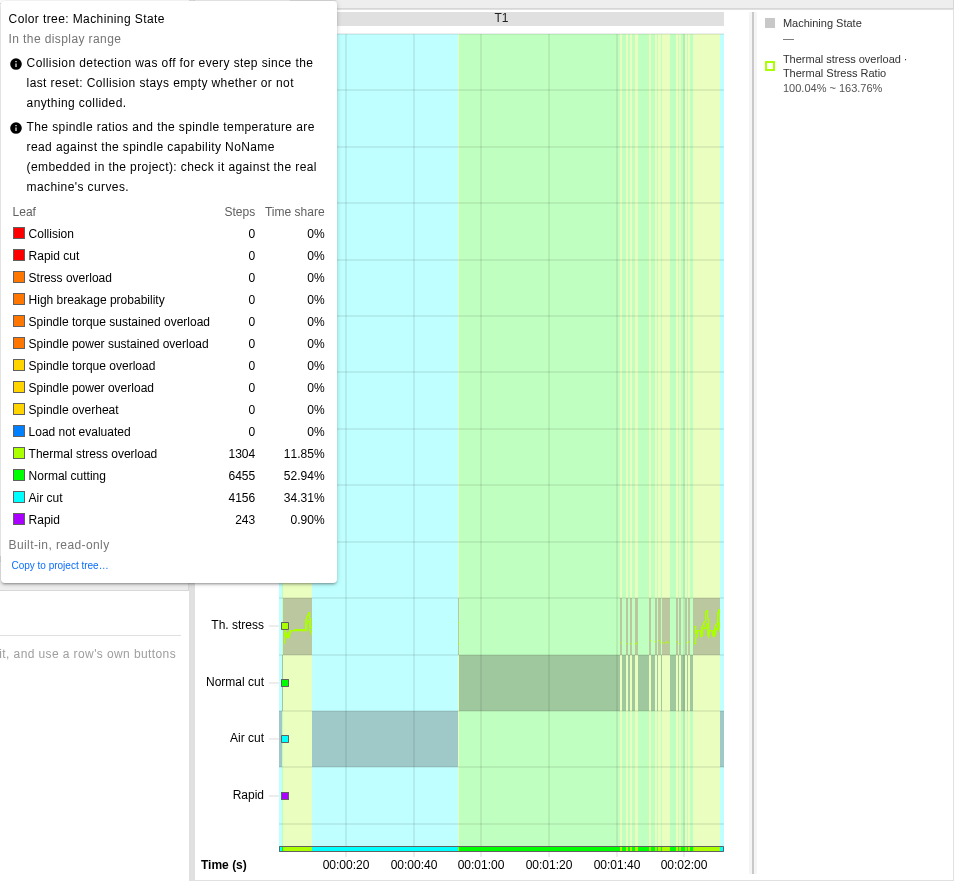
The chart at /execution after a play with the physics on, whose mission's Collision Detection
command has Enable Collision Detection cleared, its row reading Collision Detection [Off]: the
dropdown says the detection was off, and the Collision lane is empty; its second note names the
spindle capability the spindle ratios and the spindle temperature were read against, the one embedded
in the project. Unticking the row instead would only skip the command: the detection would stay as
the project sets it, on in this one, and the first note would not appear.
See Also
- Engineering View Coloring — the two built-in trees, and where their notes are shown
- Step Colors — a project's tree, whose Colors dropdown lists a built-in tree's notes