Copying a Built-in Tree
How a built-in tree of Engineering View Coloring becomes a tree of the project's own: the Copy to Project Tree dialog, what the copy keeps and what it does not, and how a copy made on an earlier version differs. The two built-in trees and their leaves are on that page, and the panel the copy opens in is on Step Colors.
Copy to project tree… — on a tree's row in the Step Colors root's panel, or in the chart's
Colors dropdown — opens Copy to Project Tree. Its Key starts at the tree's key and Copy,
MachiningStateCopy or MachiningStateGeometryCopy, or …Copy2 and on when that is taken, and is
checked as a new tree's key is (Adding a tree); its Name starts at
the built-in tree's name and (copy), in the app language. Copy adds the copy at the end of the
project's trees and opens its panel.
The copy is the project's own tree, as the dialog says: saved with the project and editable — a
threshold, the one step of margin, a leaf of your own — and HiNC's later versions leave it as it is. It
keeps the built-in tree's node ids, the group's included, conditions and hues; its name is the
dialog's Name, and its leaves' names and short names are those of the app language, your text from
then on. The conditions being copied, High breakage probability still draws its line over
Stress overload‘s steps in a copy of Machining State, and changing one of the two conditions
makes them ordinary leaves again (Step Colors). A copy keeps the
conditions, the names and the shown values it was made with, whatever HiNC's later versions change in
the built-in tree. A copy made on 3.2.56 reads Air cut as IsRapid alone, so Air cut holds
beside every feed step that cuts and the chart bars it under each such column. A copy of Machining
State made then also takes into its two sustained leaves a run longer than 2 spindle revolutions
and shows those revolutions in their lanes (Spindle Torque Overload Revolutions, Spindle Power
Overload Revolutions), not the spindle speed deviation; keeps its two yellow leaves’ names
Spindle torque brief overload and Spindle power brief overload, the torque one showing Max
Spindle Torque Ratio; and has no High breakage probability. Copy the built-in tree again; to
keep the copy, give its Air cut the term Is Touched Is no. A copy of Machining State
made on 3.2.57 has a third term on Spindle power sustained overload,
SpindleTorqueOverloadStepOrdinal ≠ 1, so it leaves the first step of a torque run to the yellow
Spindle torque overload even where that step is past the first step of a power run with the
spindle at its end point: where a torque run begins inside an orange power run, that one step is
yellow. Copy the built-in tree again, or remove that term from the copy's Spindle power sustained
overload with its ✕. A copy carries
none of the notes: they are the built-in trees', and a project's tree has
none but the one line of a play without a spindle capability, when the spindle's quantities changed
it (Without a spindle capability). A copy of Machining State is no physics property itself: while the physics options are
hidden the picker lists it and the chart draws it, its terms on the physics tagged Physics hidden
and read all the same (Writing a Condition). Copying leaves the
color index where it was; set the copy as the color index on its panel to colour the run by it.
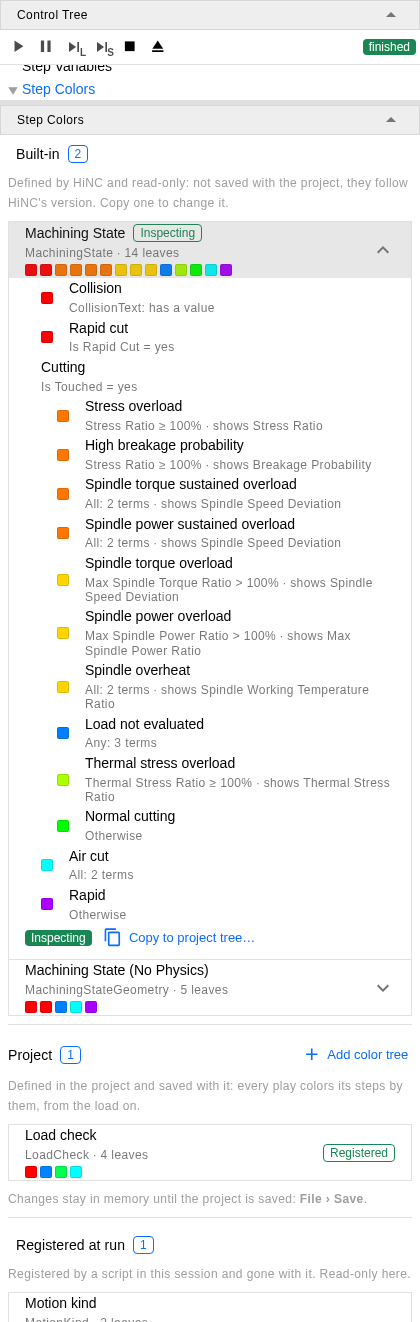
The branch at /execution?tree=execution/step-colors, Machining State set as the color index
and unfolded, in the project of the picker on Engineering View Coloring; below the picture the panel goes on with the rest
of the Registered at run group's one row, Motion kind.
See Also
- Engineering View Coloring — the two built-in trees a copy is made from, their leaves and where they are listed