Coolant
Two thermal settings sit beside each other in the equipment tree: how the cutting zone is cooled, and how warm the shop is around it. Both feed the milling-temperature model, so they move computed temperatures and everything downstream of them — and setting them needs no heat-transfer numbers at all, because the cooling types ship as ready-made files.
Where it is
The Equipment page, at /equipment, reached from the menu bar's Equipment switch.
Ambient Temperature (/equipment?tree=equipment/background/environment-temperature) and
Coolant (/equipment?tree=equipment/background/coolant) are the two leaves of the Control
Tree's Environment root, between Spindle Capability and Controller (the ids spell that root
background). Like Spindle Capability, the root is on the tree only while Show Physics Options
is on in the Preference menu. Both leaves are inert until a project is open: the fields are
disabled and the panel says so.
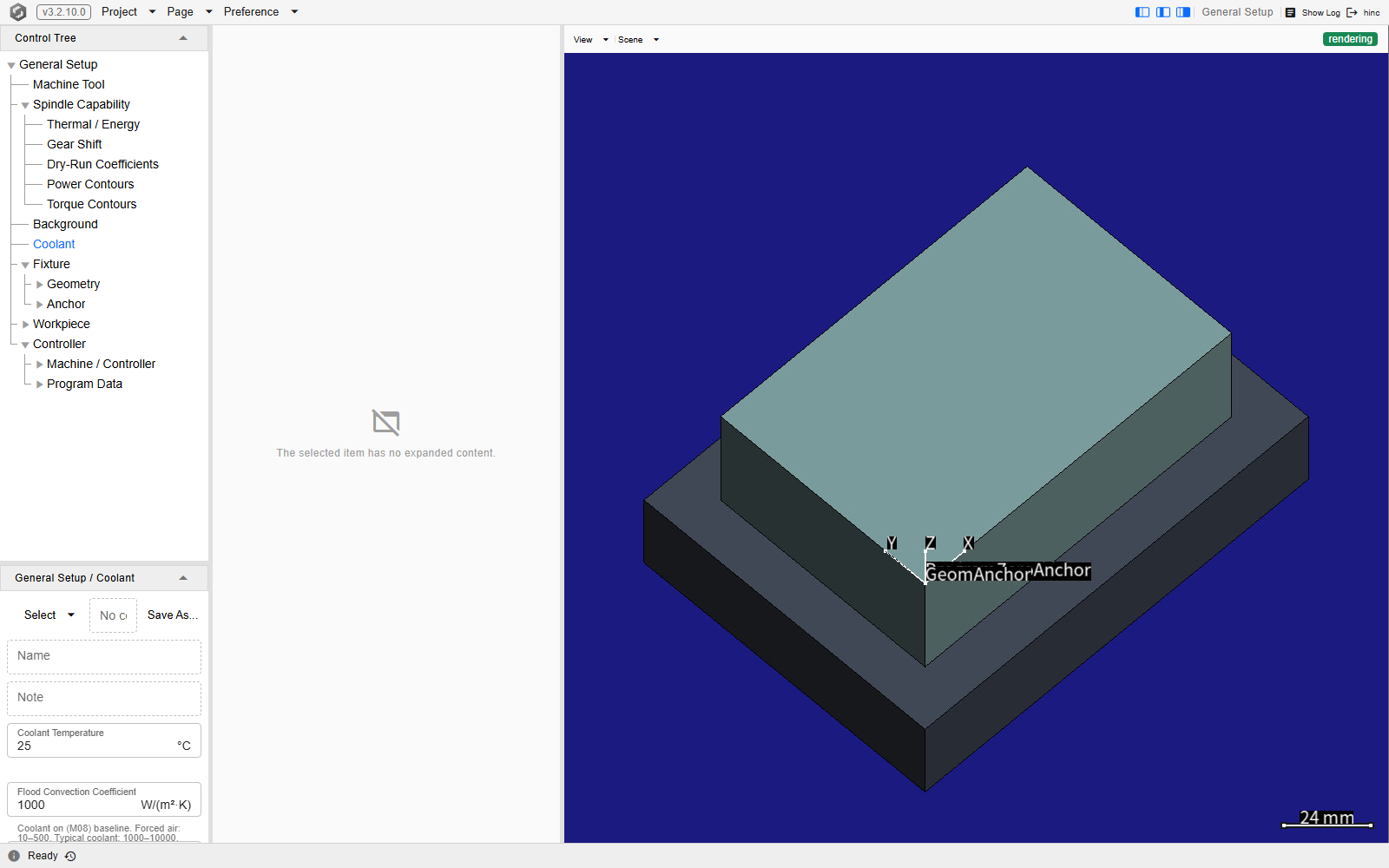
The Coolant leaf's panel on a demo project, in the editor column beside the tree, whose title bar names the selection Environment / Coolant. The panel opens with the file row — the Select dropdown, the path field reading No coolant file (saved inline), and Save As… — then the read-only Name and Note of whatever file is loaded, and then the condition's four values, the last three with the app's own working range underneath.
Pick a cooling type
The three standard cooling types ship as ready-made .CoolantHeatCondition files, so picking one
is the cooling-type selection — exactly the way a workpiece material file is picked.
- Select the Coolant leaf.
- Open the Select dropdown at the left of the file row and choose Browse Resource…. It opens the file picker in the shipped library's own coolant folder, so the three files below are what it lists. Browse… above it opens the same picker without that jump, which is how a condition you saved yourself is reached.
- Pick the file that matches the machine.
| Shipped file | Pick it when |
|---|---|
| StandardForcedAir | The machine only blows air at the cutter — no liquid coolant. |
| StandardWaterSolubleCoolant | Water-based emulsion coolant, the common flood coolant. |
| StandardOilBasedCoolant | Neat-oil cutting fluid: better lubrication, noticeably less heat removal than water-based. |
Loading a file fills the read-only Name and Note and every value below them, reports the name it loaded, and starts tracking the file: the path field names it, and the project saves a reference to it rather than the values inline. A file picked from outside the project folder, the three shipped ones included, is first copied into the project folder, and the path field names that copy, so the shipped file itself is never written over.
A project nobody has touched here is not neutral. Every project carries a coolant condition from the moment it exists, and it starts on the water-soluble numbers — 25 °C, a flood baseline of 1000 W/(m²·K), a mist ratio of 0.5 and 50 W/(m²·K) with the coolant off. The read-only Name is blank, because no file has been picked, and that blank is the only sign that nobody chose these values. A dry-cutting machine left alone therefore simulates as though it were cooled with water-soluble coolant whenever its program turns coolant on (M08 flood or M07 mist), and its computed temperatures come out low.
The four values
They are visible whether or not a file is loaded, and editing one tunes this project's copy rather than the file it came from. All but Coolant Temperature carry the app's own working range as a hint:
| Field | What it is | Range the panel suggests |
|---|---|---|
| Coolant Temperature (°C) | The temperature of the coolant as it arrives at the cut | — |
| Flood Convection Coefficient (W/(m²·K)) | Heat removal with the coolant on | Forced air 10–500; typical liquid coolant 1000–10000 |
| Mist / Flood Ratio | Mist heat removal relative to flood | Typically 0.4–0.8 |
| Off (Air) Convection Coefficient (W/(m²·K)) | Heat removal with the coolant off | Natural air 5–25; forced air inside an enclosure about 50 |
Negative temperatures are accepted, for cryogenic coolant; the other three fields cannot go below zero.
Which of the three coefficients is in force at any moment is not decided here — the NC program's own M07 / M08 / M09 decide it, step by step. That, and what the numbers do to the simulation, are Coolant Model.
Keeping a tuned condition
Save As… writes the current values out as a .CoolantHeatCondition file in the project folder
and starts tracking it, so the project saves a reference to the file instead of a copy of the
values. It offers a name taken from the loaded condition; a file picked from the shipped library
loses its .default marker on the way, because that marker means shipped and a file you saved is
yours. While a file is tracked, the Select dropdown also offers Clear, which stops tracking
it: the values stay, and the project saves them inline again.
The result is loadable into the next project through the same Select dropdown — which is the point of saving one: a shop with its own measured coolant performance describes it once.
Ambient temperature
The Ambient Temperature leaf carries a single field of the same name, in °C: the shop-floor ambient temperature — the temperature the workpiece, the cutter and the chips start at, and the one the spindle cools toward. The spindle itself starts a run at its own initial temperature, 35 °C by default, which this field does not set. The cutting zone itself convects to the Coolant leaf's coolant temperature, not to this one. It defaults to 25 °C, it belongs to the project exactly as the coolant condition does, and it is read by the same milling-temperature model and by the feed optimizer, so it is not a display setting.
Set it to the shop's real ambient temperature. There is no file to load and nothing else to configure: one number, applied to the whole project.
See Also
- Coolant Model — the coefficients, the M-code that selects one, the shipped presets and the file format
- Environment: Ambient Temperature / Coolant Page — the Control-Tree editor for these values, field by field
- Setup — the rest of the pre-simulation configuration