Using Hi.Disp.Drawing
The Drawing class is the most fundamental and efficient rendering unit that allows you to draw points, lines, and surfaces within the DispEngine.
Understanding Drawing Structure
Looking at the constructor Drawing(double[], Stamp, int) helps explain its structure:
- The
double[]array contains batch data for rendering, composed of one or more data groups of consistent length - Each data group's length is determined by the Stamp parameter
- Each data group describes a single vertex
Data Components
A data group can contain up to four types of information:
| Information | Abbreviation | Description | Size |
|---|---|---|---|
| Vertex | V | The position of the point (x, y, z) | 3 doubles |
| Normal | N | The normal vector affecting light reflection (Nx, Ny, Nz) | 3 doubles |
| Color | C | RGB color values ranging from 0 to 1 | 3 doubles |
| Pick ID | P | A single double value converted from an integer for selection operations | 1 double |
The Stamp enumeration combines these abbreviations to create these possible stamps: {V, NV, CV, CNV, PV, PNV, PCV, PCNV}.
Important Notes:
- The Vertex (V) is mandatory, which is why V appears in every Stamp option
- Normal vectors (N) are typically used for 3D graphics to create a sense of depth through lighting
- Color (C) uses three double values (R, G, B) in the range of 0 to 1
- Pick ID (P) is used for graphical selection operations
Data Structure Example
- If Stamp is
V, each data group consists of 3 double values (x, y, z) - If Stamp is
PCV, each data group consists of 1(P) + 3(C) + 3(V) = 7 double values
Rendering Mode
The glmode parameter is an OpenGL constant that specifies the drawing mode. You can search for “OpenGL Primitives” online to see illustrations of these modes.
Example Usage
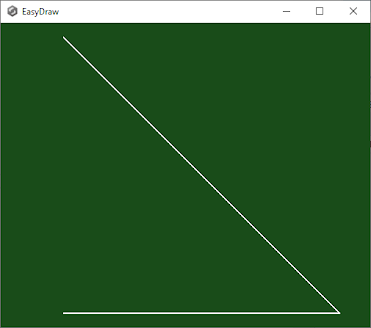
// Creating a simple line strip with three vertices
double[] vertices = new double[] {
    0, 0, 0,  // First point at origin
    1, 0, 0,  // Second point along X-axis
    0, 0, 1   // Third point along Z-axis
};

// Create drawing object using the vertices
var drawing = new Drawing(vertices, Stamp.V, (int)OpenGL.GL_LINE_STRIP);
This example creates three vertices with only position information (V), so each vertex has just xyz coordinates. The drawing mode is set to LineStrip.
Performance Considerations
Note
After a Drawing object is created, its source data is stored in GPU memory. Regardless of the amount of data, the CPU processing load when calling Display(Bind) remains consistent. This means displaying 100 points with one Drawing object is approximately 100 times faster than using 100 separate Drawing objects to display 100 individual points.
Composing Multiple IDisplayee Objects
A common pattern is to combine multiple IDisplayee objects, including Drawing objects:
public class MyCompositeDisplayee : IDisplayee
{
    private readonly List<IDisplayee> _displayees = new List<IDisplayee>();

    public MyCompositeDisplayee()
    {
        // Create a grid drawing
        _displayees.Add(CreateGridDrawing());

        // Create an axes drawing
        _displayees.Add(CreateAxesDrawing());

        // Add other custom drawings
        _displayees.Add(CreateCustomDrawing());
    }

    private Drawing CreateGridDrawing()
    {
        // Code to create a grid
        double[] gridVertices = new double[/* grid data */];
        return new Drawing(gridVertices, Stamp.CV, (int)OpenGL.GL_LINES);
    }

    private Drawing CreateAxesDrawing()
    {
        // Create colored axes
        double[] axesData = new double[] {
            // Red X-axis (with color)
            1, 0, 0,  0, 0, 0,  // Red color, origin
            1, 0, 0,  1, 0, 0,  // Red color, x-axis end

            // Green Y-axis (with color)
            0, 1, 0,  0, 0, 0,  // Green color, origin
            0, 1, 0,  0, 1, 0,  // Green color, y-axis end

            // Blue Z-axis (with color)
            0, 0, 1,  0, 0, 0,  // Blue color, origin
            0, 0, 1,  0, 0, 1   // Blue color, z-axis end
        };

        return new Drawing(axesData, Stamp.CV, (int)OpenGL.GL_LINES);
    }

    public void Display(Bind bind)
    {
        // Render all contained displayees
        foreach (var displayee in _displayees)
        {
            displayee.Display(bind);
        }
    }

    public void ExpandToBox3d(Box3d box)
    {
        // Update bounding box based on all displayees
        foreach (var displayee in _displayees)
        {
            displayee.ExpandToBox3d(box);
        }
    }
}
Creating Common Shapes
Here are some examples of creating common shapes using the Drawing class:
Creating Points
// Create an array of points
double[] pointData = new double[] {
    0, 0, 0,    // Point 1
    1, 1, 1,    // Point 2
    2, 0, 0,    // Point 3
    0, 2, 0     // Point 4
};

// Create a Drawing for points
var pointDrawing = new Drawing(pointData, Stamp.V, (int)OpenGL.GL_POINTS);
Creating Lines
// Create line segments (pairs of vertices)
double[] lineData = new double[] {
    0, 0, 0,  1, 1, 0,   // Line 1: (0,0,0) to (1,1,0)
    2, 0, 0,  2, 2, 0    // Line 2: (2,0,0) to (2,2,0)
};

// Create a Drawing for lines
var lineDrawing = new Drawing(lineData, Stamp.V, (int)OpenGL.GL_LINES);
Creating Triangles
// Create triangles (triplets of vertices)
double[] triangleData = new double[] {
    // Triangle 1
    0, 0, 0,    // Vertex 1
    1, 0, 0,    // Vertex 2
    0, 1, 0     // Vertex 3
};

// Create a Drawing for triangles
var triangleDrawing = new Drawing(triangleData, Stamp.V, (int)OpenGL.GL_TRIANGLES);